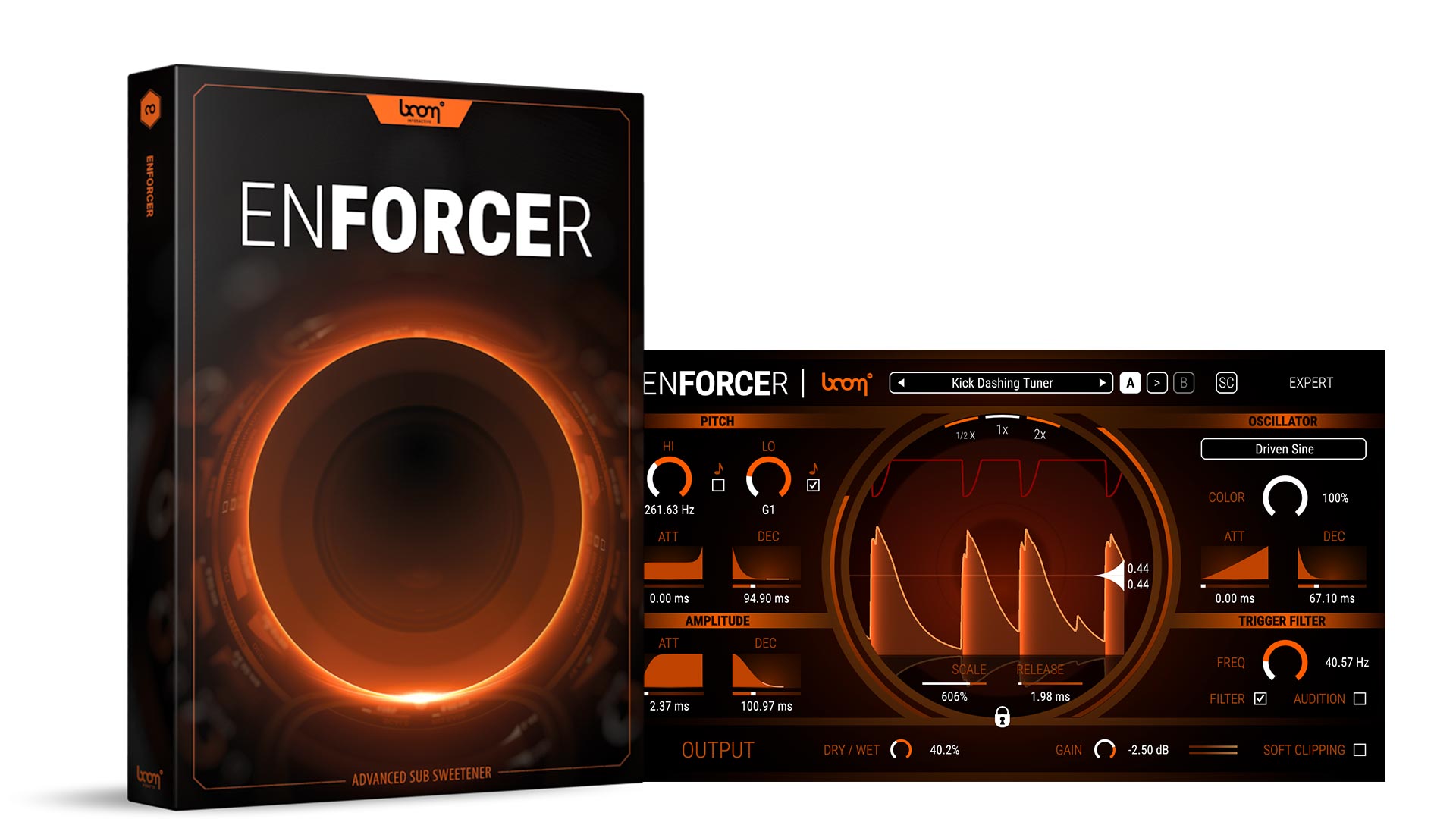
MANUAL
PREFACE
Ever wasted your time adding sub sweeteners to every single shot of a fully automatic weapon? Ever got stuck layering a kick drum with controllable and tunable low-end or enhance live drums with well defined punch? Having a hard time adding steady weight to every single footstep? Look no further, Enforcer is the Swiss Army Knife for punch, low-end, sub power, kick… you name it.
Enforcer, a kick drum designer with benefits, can be triggered by your source audio material. Thus it becomes easy and convenient to pimp up existing percussive audio material. Beef up sounds or add only a hint of weight, exchange kick drum tails and tune them easily using semitones or completely exchange given source sounds. To top it off, there is a dynamics section which you can use to clean up low frequencies or make space for the heavy bass load to come. A scalpel for punch with unmatched precision.
Have fun, push your sub to the limits - in an extremely controllable way.
Minimum System Requirements
WINDOWS: Windows 8 (64-bit), 8 GB RAM, Intel® Core™ i5 (relatively recent)
OpenGL 2.1 capable GPU
MAC: macOS 10.13 (64-bit), 8 GB RAM, Apple Silicon or Intel® Core™ i5 (relatively recent)
OpenGL 2.1 capable GPU
Installation
After downloading and opening the installer for the ENFORCER plug-in please follow the on-screen instructions to install the ENFORCER plug-in. Files will be copied into the common VST2.4, AU (macOS only) or Pro Tools plug-in folders on your computer. Your host should recognize the plug-in automatically with the next restart and you will be asked to register the ENFORCER with your iLok account. If the host does not recognize the plug-in automatically, please follow these instructions for manual installation:
Windows
If your host does not recognize the plug-in, you might need to manually copy it to the host specific plug-in path. Please locate the plug-ins folder and copy the “ENFORCER.dll” from the folder you selected during the ENFORCER installation to this host specific folder.
macOS
On macOS you will find the standard plug-in folders in the system library folders. The paths are as follows:
Audio Units (AU): /Library/Audio/Plug-Ins/Components
VST/VST3: /Library/Audio/Plug-Ins/VST and /Library/Audio/Plug-Ins/VST3
AAX: /Library/Application Support/Avid/Audio/Plug-Ins
AU and VST/VST3 plug-ins may be placed in the user's library folders under as well: USER/Library/Audio/Plug-Ins
Registration
Muse Hub Registration
If you obtained the plug-in from Muse Hub, and experience issues with activation, please use the Contact Support button found on the LiftFX Muse Hub project page, or visit https://support.musehub.com/.
iLok Registration
Upon the first launch of the application, you will be asked to register LIFTFX with your iLok account.
A free iLok account can be created under www.ilok.com
During the first start of LIFTFX after installation, the iLok registration window pops up. LIFTFX is licensed using the PACE Licensing Platform. You need to have an iLok account to use it, however setting up an iLok account is free. You will find all necessary information on how to setup your account on www.ilok.com. You can either directly authorize your computer (machine authorization) or use a 2nd or higher generation iLok hardware dongle. A second or third generation iLok (iLok2 or iLok3) is a product of PACE that can be purchased at www.ilok.com or from any participating music retailer.
Next: please download the iLok License Manager at www.ilok.com.
After your purchase, you automatically receive an order confirmation from us containing the download link for the installer plus a 30 digits long iLok activation code (e.g. 1234-1234-1234-1234-1234-1234-1234-12).
- Open the iLok License Manager application.
- Either select the menu: Licenses -> Redeem Activation Code or click on the small Redeem Activation Code Icon on the upper right of the application.
- You should then copy paste the entire code you received from us into the entry form. Select your iLok as the activation location to immediately activate the license on this iLok and confirm the location.
Watch a step-by-step video tutorial about how to activate your iLok license:
Now you are ready to go!
Uninstalling
To remove the plug-in from your system, including its presets and settings, follow the step-by-step guide in our FAQ: How do I uninstall BOOM plug-ins?
If you want to use the plug-in on another computer, deactivate the license in the iLok License Manager first.
Quick Start
Create a mono or stereo audio track and import percussive audio material that you want to use ENFORCER on. Setup the DETECTOR (the big circle in the middle of the GUI) in a way that only those parts rise above the UPPER THRESHOLD that should trigger the ENFORCER and the LOWER THRESHOLD to a value that needs to be reached before the ENFORCER triggers again. Use SCALE, RELEASE and if needed the FILTER section to do so.
There is a visualization in form of a frequency dependent animation in the DETECTOR as well as a vertical orange highlight when ENFORCER gets triggered.
Once you are set, select different presets for a good starting point.
GUI Overview
IMPORTANT: Every white element in the interface is either a button, a knob or a numeric input and can be altered or pressed.
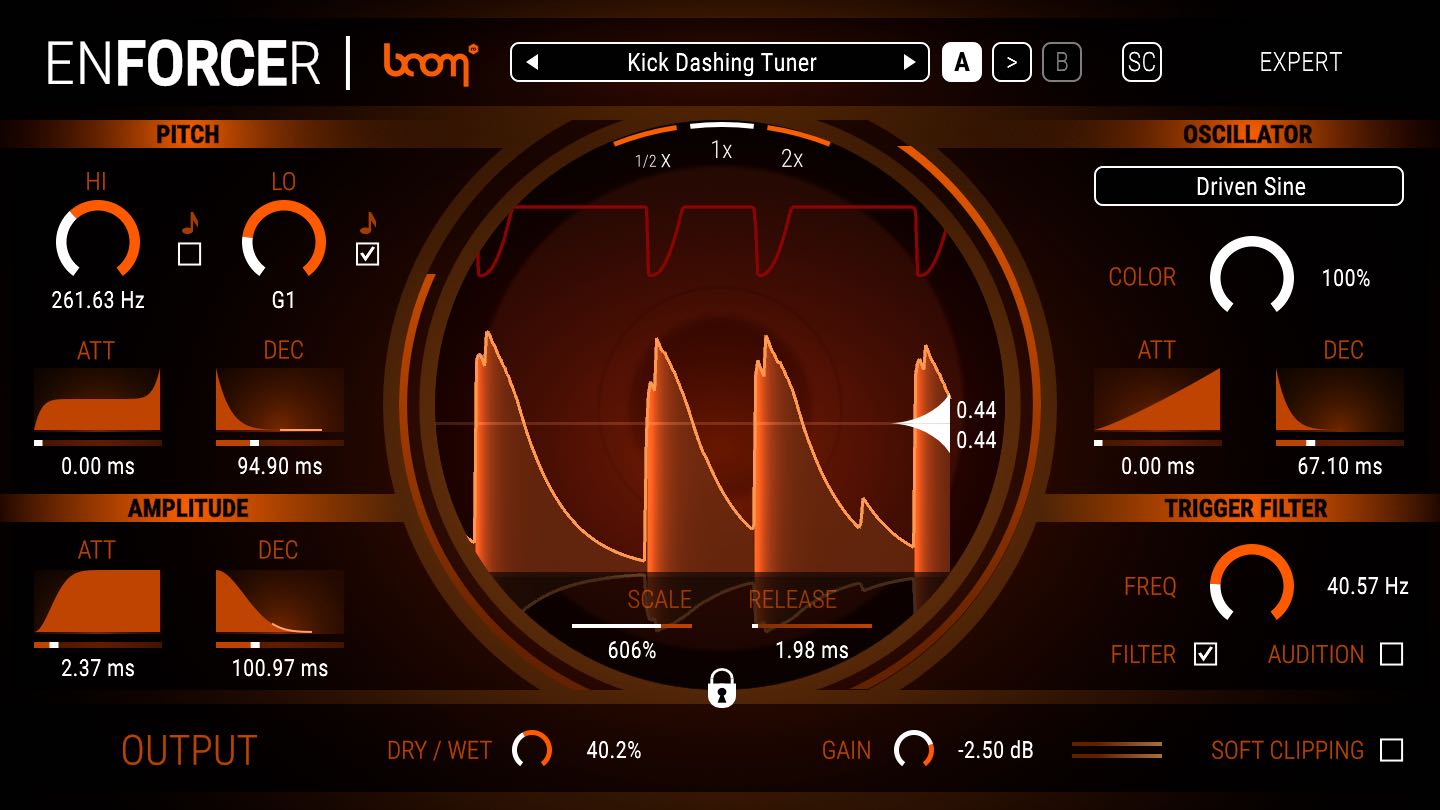
Tool Tips will be displayed when you hover 3 seconds above any parameter.
Header

From left to right you will find the following:
ENFORCER | BOOM

The name of the plug-in ENFORCER combined with the “BOOM Interactive“-logo will bring you to the credits and copyright.
Presets

By left clicking in the middle of the preset name – “INIT” by default – a drop down menu opens which shows you several categories, each containing a set of presets. Even if you work on music, don’t hesitate to try out the SFX presets and the other way round. You might find something that works in your current situation in categories not labelled specific to your needs.
The little white arrows on the left and right of the current preset name load the previous or next preset.
You can also save and load presets by right clicking onto the presets dropdown menu.
A > B Comparison

BOn the right next to the PRESETS you will find three buttons. [A], [>] (or [<] when B is selected) and [B]. This is the A/B comparison feature. By default A is selected and B is empty. You can copy the A settings to B when A is selected by clicking the arrow “>” button. Click on [B] and hit the “<” to copy B to A. Now you can change the settings in either A or B and switch between them to check if altered settings suit your content better. You can even compare to another preset. The current comparison slot [A] or [B] will be replaced by new settings when you load a preset. The unselected slot stays untouched for comparison.
SC, Sidechain
The [SC] button activates or deactivates the SIDECHAIN mode. This makes it possible to trigger the ENFORCER using a different source. The DETECTOR will show you the SIDECHAIN signal instead of the actual input signal. However, the DUCKING / DUCKING FILTER function (found in ADVANCED mode) and DRY/WET still applies to the original input signal on the track ENFORCER is used on.
Detector & Trigger Filter
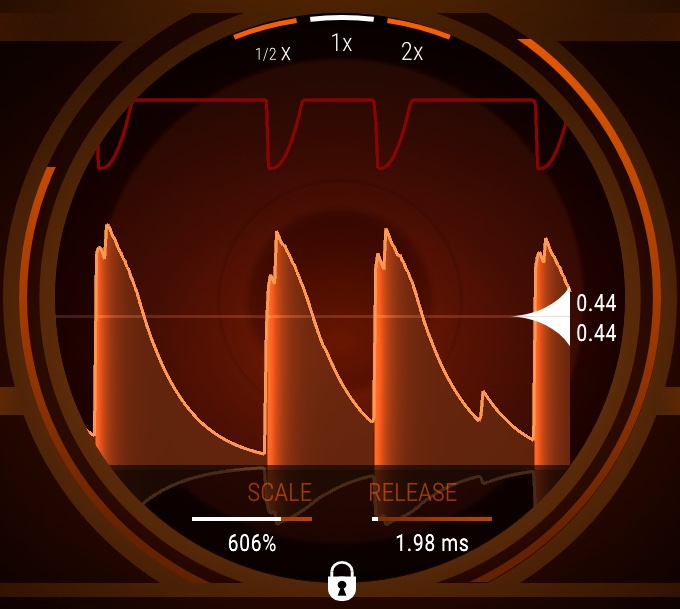
The DETECTOR is the heart of the Enforcer, shown in the big circle in the middle of the GUI and it is what makes the ENFORCER really special. There are several ways to tweak the display to get very tight control of when the ENFORCER should be triggered.
INPUT METER & EFFECT METER

To the left of the DETECTOR you can find a INPUT METER that gives you a quick amplitude overview of the dry input signal. On the right of the DETECTOR you will find a EFFECT METER that displays the amplitude of the wet effect signal Enforcer produces.
ZOOM ½x, 1x, 2x
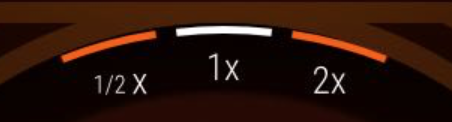
At the top of the DETECTOR you will find three little ZOOM indicators. These alter the speed and therefore the amount of time you can overview within the DETECTOR. This can help to find the right settings. By default, it is set to 1x.
Thresholds
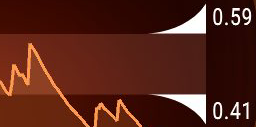
The THRESHOLDS determine when the ENFORCER gets triggered and how long it should wait until it gets triggered again.
Upper Threshold
The UPPER THRESHOLD sets the value that needs to be reached in order to trigger the ENFORCER. It is comparable to a compressor threshold, which determines when the compressor starts working. Set it as low as possible and as high as needed. You can either drag it or double click to input numeric values.
Lower Threshold
The LOWER THRESHOLD determines which level the DETECTOR needs to fall below before the ENFORCER can be triggered again. This avoids an overload of trigger points.
Scale
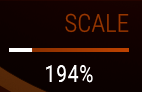
SCALE basically zooms the amplitude in and out. There are two situations that can make this useful.
- First, your input signal is simply too quiet to get reasonable peaks for an easy DETECTOR setup. You can simply zoom in vertically to get better control.
- Secondly, you can push the scale up further to see more detail in the quieter portion of the input signal. This is useful to catch the onset of transients earlier.
Release
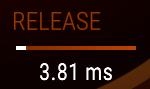
The RELEASE lets you smooth the DETECTOR waveform. This is helpful with very dynamic input material to get rid of a lot of peaks or transients. The result is less trigger points and a less hectic waveform display.
Trigger Filter
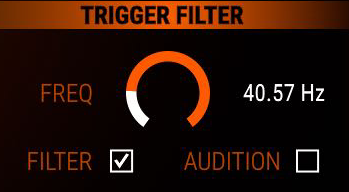
Another option to alter the DETECTOR visualization and behavior is the TRIGGER FILTER – a bandpass which isolates certain frequencies within your signal to trigger only specific spots of the input signal depending on the frequency.
Freq, Frequency
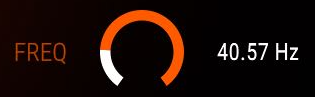
Set the frequency of the TRIGGER FILTER at which the bandpass should be.
Filter

Activates or deactivates the TRIGGER FILTER.
Audition

For the ease of use you can audition the bandpassed input signal. That makes it a lot easier to find the right frequency Enforcer uses to be triggered.
TIP: When using the TRIGGER FILTER, the whole displayed waveform will change accordingly. In most cases you will have to alter the Thresholds to get the right trigger spots. Do not forget to use SCALE and RELEASE to make your life easier.
PITCH & AMPLITUDE
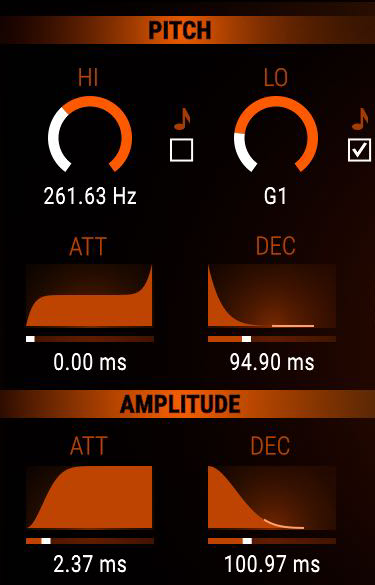
On the left you will find PITCH and AMPLITUDE, the most important parameters to tweak a sound to your needs. When Enforcer gets triggered, it generates a signal which is starting from the LO PITCH, rising over the ATTACK time of the pitch up to the HI PITCH and falls back to LO PITCH over the DECAY. Use the attack time for detailed transient shaping.
HI, High Pitch
HI, the HIGH PITCH, determines which frequencies will be reached after the attack (ATT) time. In most common situations this alters the sound into a more subtle, soft direction when lower frequencies / tones are used and a punchier, probably even harsh sound when higher frequencies / tones are used. Either left click on the knob drag up or down or enter a value numerically by double clicking on the numbers. Pressing shift while dragging the HI PITCH changes the LO PITCH by the same amount.
LO, Low Pitch
LO or LOW PITCH determines the starting frequency and even more important the ending frequency when the end of the decay (DEC) time is reached. In most common situations this defines the overall frequency / tone the sound is perceived in general. Either left click on the knob drag up or down or enter a value numerically by double clicking on the numbers. To make tuning easier, holding down shift while dragging the frequency / tone with the mouse changes the HI PITCH by the same amount.
[♪], KEY MODE
On the right next to the HI and LO knobs you can find a radio button to toggle betweenfrequency mode and key mode. In key mode you can “tune” the effect sound in a musical manner. Either drag the knob or enter keys like G#1 or B2 to change the tone. If there is a – or + next to the key, you most likely switched from frequency to tone and the set frequency is between two semitones. Therefore, “A1-“ means the set frequency is a bit lower than A1, “G#1+” means a bit higher than G#1.
LINK PITCH
Between the HI and LO PITCH values you will find a chain symbol. By pressing the chain symbol you can link HI and LO PITCH and LO PITCH gets control over HI PITCH in relation to the previously set amount. Automation of HI PITCH when link is activated will have no effect, however you can automate both by using the automation of LO PITCH.
MIDI MODE
MIDI in general is an alternate way to trigger Enforcer without the need for the Detector. Every key plays back the settings currently set in the Enforcer. Simply create a MIDI track in your host and select Enforcer’s MIDI input to trigger it. If the little MIDI icon below the LO PITCH KEY MODE option has been activated, LO PITCH will be controlled via keyboard input. That means you can alter the PITCH by playing the desired key on your keyboard. This work either with activated LINK PITCH or without.
ATT, PITCH ATTACK
The ATT, or PITCH ATTACK shows how much time it takes for the frequency / tone to go from the starting LO frequency to the HI frequency. Set a time by dragging the slider or number with the mouse from left to right or using numeric input by double clicking on the ms (millisecond) value. Change the basic curve type by right clicking on the GRAPH display and change the curve behavior by dragging the curve up and down. A small dot shows the current position of the sound generator within the curve.
DEC, PITCH DECAY
The DEC, or PITCH DECAY shows how much time it takes for the frequency / tone to go back from the HI frequency to the LO frequency after the ATT. Set a time by dragging the slider or number with the mouse from left to right or using numeric input by double clicking on the ms (millisecond) value. Change the basic curve type by right clicking on the graphical curve display and change the curve behavior by dragging the curve up and down. A small dot shows the current position of the sound generator within the curve.
ATT, AMPLITUDE ATTACK
The AMPLITUDE ATTACK (ATT) behaves the same way as the PITCH ATTACK but it changes the loudness behavior rather than the frequency / tones. Using high AMPLITUDE ATTACK times result in smooth, soft starts, short or even zero millisecond ATTACK times can create clicky, smacking sounds.
DEC, AMPLITUDE DECAY
Again, the AMPLITUDE DECAY (DEC) behaves the same way as the PITCH DECAY but it changes the loudness rather than the frequency. Short Decay times create more knocking, punching sound; longer decay time in more boomy, sustained sounds.
- If the overall AMPLITUDE time (ATT + DEC) is higher than the overall PITCH time, the LO PITCH will be static near the end.
- A shorter combined AMPLITUDE time compared to the combined PITCH time might fade out the effect sound even before the LO PITCH has been.
Oscillator
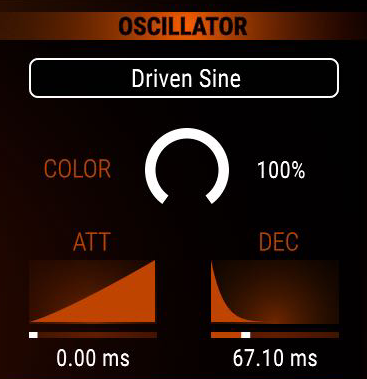
The OSCILLATOR is the engine of the ENFORCER. There are different synthesizers that youcan choose from to alter the overall sonic experience.
Color
To get control over the different synthesizers, we introduced a COLOR parameter. The lower the color, the softer, more sinus-like the resulting sound will be. The higher the COLOR the more character and overtones will be produced.
ATT, COLOR ATTACK
Similar to PITCH ATTACK and AMPLITUDE ATTACK, the COLOR ATTACK determines how long it takes to reach the set amount of maximum COLOR.
DEC, COLOR DECAY
Similar to PITCH DECAY and AMPLITUDE DECAY, the COLOR DECAY determines how long it takes to go from the set maximum COLOR back to zero COLOR.
Ducking
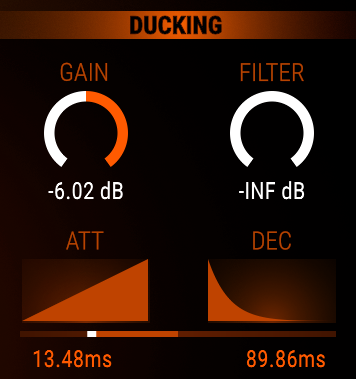
The DUCKING makes room to push the low frequencies ENFORCER produces to give more headroom and an overall lower acoustic experience. Thus the DUCKING is dependent on the combined AMPLITUDE time for perfect precision.
GAIN
GAIN sets the full spectrum DUCKING of the original input signal corresponding to the length of the AMPLITUDE ATT + DEC.
FILTER
ENFORCER can produce very low frequencies. To avoid rumbling and a low frequency mess, the DUCKING FILTER helps you to clean up. It is a notch filter that removes exactly the frequencies the Enforcer produces. The result is a lot less obvious compared to the DUCKING GAIN; at the same time it can shape the output signal less extremely.
ATT, DUCKING ATTACK
In order to be able to shape the DUCKING behavior for both, the full spectrum DUCKING GAIN and the DUCKING FILTER there is yet another envelope. The shape can be altered in the same way as the other envelopes, however the time is controlled via a ratio between DUCKING ATTACK and DUCKING DECAY, having a total length of AMPLITUDE ATTACK + AMPLITUDE DECAY. Using this parameter, you can for example let all the transients of the original signal pass through and only duck when the Enforcer reaches very low frequencies.
DEC, DUCKING DECAY
Being the opposite of DUCKING ATTACK, this parameter gives you control over the DUCKING DECAY. You can create extremely pumping results or smooth and subtle DUCKING behaviors.
SETTINGS
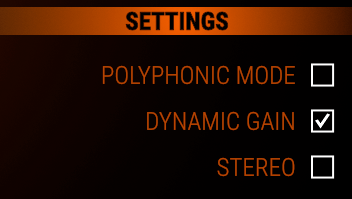
POLYPHONIC MODE
By default, ENFORCER is set to monophonic mode. The basic idea is that you want to create extremely controllable low frequency audio material. POLYPHONIC MODE might be useful in certain situations but should be used with caution. When activated it can easily add low frequencies to an unpleasant amount.
DYNAMIC GAIN
This option rides the Enforcer effect sound along with the input signal. Thus when the input signal gets softer, the wet Enforcer signal follows and the other way around. This gives less control in the low end, but can be specifically helpful to maintain dynamics of a live drum kit or in foley situations etc.
STEREO
Only available when DYNAMIC GAIN is activated, in STEREO MODE the Enforcer signal gets panned according to the input signal.
PHASE
In some cases you will recognise phase cancellation. To avoid this you can switch the phase of Enforcer’s generated sound.
Output

DRY / WET
DRY/WET determines the ratio between the DRY, original input signal and the WET, synthesized signal ENFORCER produces.
GAIN
Because ENFORCER generates new audio material on top, the result can be louder than the original input signal. Gain gives you the option to lower the output gain.
OUTPUT METER
Between GAIN and SOFT CLIPPING you can find an OUTPUT METER. A red LED indicates digital clipping at ENFORCER’s output.
SOFT CLIPPING
As a last little helper, SOFT CLIPPING avoids clipping of the combined output signal. When the output gets really loud, the SOFT CLIPPING will introduce a saturation effect that may or may not achieve the desired outcome. For clean, undistorted and unclipped results use GAIN instead and deactivate SOFT CLIPPING.
TIPS AND TRICKS
GENERAL
AVOID SUPER LOW FREQUENCIES
Assuming you have set everything up and found the right sound that suits your needs.
- Double check if perhaps the AMPLITUDE is longer than needed. There are several curve types available, so if the behavior of the AMPLITUDE is right, but you still cannot hear the last second anymore, try to get the same loudness behavior minus this one second, potentially using another curve.
- Use A/B comparison slots to check if you are on the right track. The reason is that low frequencies are power intense and you rather want to have controllable sub frequencies than something that just takes away energy from your mix.
SIDECHAIN DUCKING
The DUCKING follows the envelope and the DUCKING envelope. Thus you can do some advanced envelope shapes here. It is possible to only use the DUCKING on a track by setting the DRY/WET to 0% (full dry). Thinking a bit further, you can also use any sidechain input and use only the ducking on the given track. A third option and probably really interesting, especially when the DUCKING FILTER is taken into account, is the possibility to copy paste Enforcer that has been used on a kickdrum or SFX track to another track or bus, then setting this to 0% DRY/WET and use the DUCKING. This way you can make room for the Enforcer in a complete mix or mixbus.
HEADER
A/B COMPARISON
Use A/B COMPARISON often. Use it to create backups of current settings and of course use it to compare the old settings to settings you just altered. It’s easy to lose track of what you just did and the A/B COMPARISON really helps to stay focused on the main task: Listening rather than remembering what you just did.
SIDECHAIN AND DUCKING
You are mixing a music track and want the kick to be enforced. What you would normally do is instantiating ENFORCER on the track containing the kick drum. However, sometimes it might make sense to put it onto a bus or even the master channel and trigger it via the original track using SIDECHAIN. One benefit is that you can place it after a compressor or limiter to get more control and really push it in the end. Another useful scenario is that you can duck the full spectrum dry signal using the DUCKING feature to get more space for the ENFORCER output or clean up low frequency mess in the mix by using the DUCKING FILTER on the complete mix or a bus.
USE HIGHER FREQUENCIES
More punch is not necessarily lower frequencies. Do not always use the 16Hz (or probably even try to avoid these). Punch can be created using higher frequencies as well! If Enforcer creates low frequencies that you can not hear / monitor you should either raise the frequency or shorten the Amplitude rather than creating super low sub frequencies you cannot control acoustically.
End User License Agreement
This license agreement is a single-user license agreement. For multi-user licenses and multi-user discounts, please contact us via service@boomlibrary.com
The following End User License Agreement ("EULA") represents the contractual conditions between you ("Licensee" or “you”) and BOOM Library. ("BOOM", visit www.boomlibrary.com/about for the official legal company details and address) for the use of audio software plug-ins including related media, documentation (e.g. manuals) and other documents and materials (e.g. presets) manufactured by BOOM ("audio-plug-ins" or “software”). By installing and by registering the software on your computer, you declare yourself in agreement with these conditions. If you do not agree with these conditions, you are not allowed to install the software. Copyright laws and international copyright treaties, as well as other intellectual property laws and treaties protect the content. All rights not expressly granted to Licensee hereunder are reserved by BOOM.
SECTION 1 – INTRODUCTION:
1. What You Get:
- a. You get to install the software on up to two (2) computers that you, only, use. They can be your computer in an edit bay and a laptop for the field, or your computer at work (or school) and your computer at home, etc.
- b. Please note that you need a sequencer software to run our audio plug-ins which is not included in this license.
- c. You can copy the software only once, for the sole purpose of making a backup copy.
- d. If you need licenses for multiple people or more workstations, you will need to get a multi-user license from us. Please contact us for multi-user pricing.
- e. If you are an educator and need a license for your lab please contact us for educational pricing.
- f. You can export, render out, re-record or otherwise save any type of sound, noise, music, pad (“work”) created with our audio plug-in and its presets and use it as part of any video, game, audio library or other media production (“media projects”), even other people’s media projects that you didn’t do, if the works are made from the copy of the audio plug-in you have on your computer and used as per our End User License Agreement.
2. What You Don’t Get:
- a. You don’t get to make any other copies of the audio plug-in.
- b. Please don’t share our audio plug-ins on the internet – we are a small company, and unlicensed copies hurt our ability to make the software better for you and bring you new products in the future.
- c. You cannot use our audio plug-ins to create works for stand-alone sound effect libraries, neither commercial, nor non-commercial, since this would hurt our business. If you want to use your works using our audio plug-ins to create your own sound effect libraries, you need an “Audio Developer License” from us, please contact us for this.
SECTION 2 – OWNERSHIP:
1. The enclosed audio plug-ins and related instructions are licensed (not sold) to you, and BOOM retains all ownership interests and intellectual property rights in the Software.
SECTION 3 – SOFTWARE LICENSE:
- 1. BOOM grants you a nonexclusive, nontransferable license to (i) install and use one copy of the Software on up to no more than two (2) computers both of which must be owned and used by you and (ii) make one copy of the Software for back-up or archival purposes only.
- 2. The software cannot be installed on a network server, without contacting us and asking for a Network license required for each workstation served on such network. You may not:
- a. copy (other than for a second computer owned and used by you and for back-up purposes), disclose, publish, export, distribute, rent, lease or sublicense
- b. remove any BOOM trademarks or copyright notices from;
- c. modify, translate or prepare derivative works of;
- d. use in a computer-based services business or publicly display visual output of;
- e. transmit by audio, digital or other electronic means or post software on any file-sharing site or
- f. reverse engineer, decompile or disassemble all or any portion of the audio plug-in in any form, except as expressly licensed herein.
SECTION 4 – AUDIO RIGHTS (RIGHTS TO THE WORKS):
- 1. This license grants the rights to produce new works using our audio plug-in. Such new works can be created using the presets included in the audio plug-in. This license includes the worldwide, royalty-free, non-exclusive right to combine or sync works created with our audio plug-in into media projects without
- a. paying any additional license fees to BOOM or any third-party other than the purchasing cost of this license;
- b. obtaining additional clearances or permissions; or
- c. providing source attribution to BOOM.
- d. This license includes mechanical, synchronization, public performance and broadcast rights.
SECTION 5 – LIMITATIONS:
- 1. This license expressly forbids any unauthorized inclusion of works created using our audio plug-ins (in whole or on part) like for example sample instruments, sound effects libraries, etc. online or offline without express written consent of BOOM. It is also not allowed to install or include or use the software or parts of the software code into applications or hardware products that you manufacture for your clients.
- 2. This license also forbids any stand-alone re-distribution method of our audio plug-ins, through any means, including but not limited to, re-selling, trading, sharing, re-compiling, mixing, processing, isolating, or embedding into other software or hardware of any kind, for the purpose of re-recording or reproduction as part of any free or commercial library of musical and/or sound effect samples and/or articulations, or any form of musical sample or sound effect sample playback system or device.
- 3. Licensee is prohibited from using works and our audio plug-ins in any product that is substantially sound effects audio and therefore would compete with other present and future BOOM products. Substantially, for the purposes of this license, is defined as containing pure sounds (without mixed in voice or music) for 80% or more of Licensee’s entire projects. Upon written request that details such potential use by Licensee, BOOM will furnish a safe-harbor letter within 30 days allowing or disallowing use for the described project.
- 4. All licenses and rights under this license are nontransferable, which means Licensee may not sell, gift, or in any way allow another individual or business the rights obtained pursuant to this license except to Licensee’s affiliates and successors. In the event that the Licensee is acquired by another business or organized under another business name or tax entity, all licenses and rights under this AGREEMENT may be transferred provided that number of users and workstations has not increased, and BOOM is notified of this transfer in writing within 30 days.
SECTION 6 – USER RESPONSIBILITY:
- 1. Licensee is responsible for installation, management and operation of the Software. Further, Licensee agrees to indemnify, hold harmless and defend BOOM from and against all claims or lawsuits, including attorneys' fees, that arise or result from any use or distribution of the Software not expressly authorized in this Agreement.
- 2. Warranty. BOOM warrants the Software media (e.g. download) to be free from defects in materials and workmanship for a period of sixty (60) days from the date of purchase. BOOM will replace any such defective media returned to BOOM during such warranty period, provided such defect is not the result of improper use or neglect, or if BOOM is unable to do so, it will refund your price for such defective Software. Replacement (or refund) is the exclusive remedy for any such defects, and BOOM shall have no liability for any other damages.
- 3. THE FOREGOING WARRANTY IS IN LIEU OF ALL OTHER EXPRESS OR IMPLIED WARRANTIES, INCLUDING ANY WARRANTIES OF MERCHANTABILITY OR FITNESS FOR A PARTICULAR PURPOSE. IN NO EVENT WILL BOOM BE LIABLE FOR ANY KIND OF SPECIAL, INCIDENTAL OR CONSEQUENTIAL DAMAGES, INCLUDING LOST PROFITS, EVEN IF BOOM HAS KNOWLEDGE OF SUCH POTENTIAL LOSS OR DAMAGE.
SECTION 7 – TERMINATION AND RESERVATION OF RIGHT:
- 1. This Agreement is effective until terminated. You may terminate it at any time by destroying the Software, including all computer programs and documentation, and erasing any copies residing on computer equipment. This Agreement also will terminate if you do not comply with any terms or conditions of this Agreement. Upon such termination, you agree to destroy the Software and erase all copies residing on computer equipment.
- 2. This Agreement may be subject to alterations due to changes in law, new distribution channels, acquisition of BOOM by a third-party entity, or new rules applied by third-party software providers on whom BOOM’s software relies. BOOM warrants that any such alteration will occur in the best interest of the Licensee and BOOM and that BOOM will inform Licensee in due time and in written form of any such changes.
SECTION 8 – AGREEMENT:
- 1. This Agreement expresses the entire understanding between you and BOOM and supersedes all other oral or written communications relating to the Software. This Agreement shall be governed and construed under the laws of the Federal Republic of Germany and subject to the exclusive jurisdiction of the courts therein.
- 2. Some content included in BOOM’s Software, as well as any associated intellectual property rights and titles, belongs to third parties. This content may be protected by copyright or other intellectual property laws and treaties and may be subject to terms and conditions from the third party providing the content.
- 3. If any section of this EULA should be or become invalid, either completely or in part, this shall not affect the validity of the remaining sections. The parties agree to make a good effort to replace the invalid section with a valid regulation that comes as close as possible to the purpose originally intended.
APPENDIX A: SOFTWARE LICENSE AGREEMENTS OF THIRD PARTIES
I - Inno Setup License:
Except where otherwise noted, all of the documentation and software included in the Inno Setup package is copyrighted by Jordan Russell. Copyright (C) 1997-2013 Jordan Russell. All rights reserved. Portions Copyright (C) 2000-2013 Martijn Laan. All rights reserved.
This software is provided "as-is," without any express or implied warranty. In no event shall the author be held liable for any damages arising from the use of this software.
Permission is granted to anyone to use this software for any purpose, including commercial applications, and to alter and redistribute it, provided that the following conditions are met:
- 1.) All redistributions of source code files must retain all copyright notices currently in place, and this list of conditions without modification.
- 2.) All redistributions in binary form must retain all occurrences of the above copyright notice and website addresses currently in place (for example, in the About boxes).
- 3.) The origin of this software must not be misrepresented; you must not claim that you wrote the original software. If you use this software to distribute a product, an acknowledgment in the product documentation would be appreciated but is not required.
- 4.) Modified versions in source or binary form must be plainly marked as such and must not be misrepresented as the original software.
Jordan Russell, jr-2010 AT jrsoftware.org, http://www.jrsoftware.org/
II - Roboto Fonts
This application uses the Roboto fonts authored by Christian Robertson and made available through Google Fonts (fonts.google.com) under the terms of the Apache Software License v2.
Version 2.0, January 2004, http://www.apache.org/licenses/
- 1.) Grant of Copyright License: Subject to the terms and conditions of this License, Apache hereby grants to You a perpetual, worldwide, non-exclusive, no-charge, royalty-free, irrevocable copyright license to reproduce, prepare Derivative Works of, publicly display, publicly perform, sublicense, and distribute the Work and such Derivative Works in Source or Object form.
- 2.) Trademarks: This License does not grant permission to use the trade names, trademarks, service marks, or product names of the Licensor, except as required for reasonable and customary use in describing the origin of the Work and reproducing the content of the NOTICE file.
- 3.) Disclaimer of Warranty: Unless required by applicable law or agreed to in writing, Licensor provides the Work (and each Contributor provides its Contributions) on an "AS IS" BASIS, WITHOUT WARRANTIES OR CONDITIONS OF ANY KIND, either express or implied, including, without limitation, any warranties or conditions of TITLE, NON-INFRINGEMENT, MERCHANTABILITY, or FITNESS FOR A PARTICULAR PURPOSE. You are solely responsible for determining the appropriateness of using or redistributing the Work and assume any risks associated with Your exercise of permissions under this License.
- 4.) Limitation of Liability: In no event and under no legal theory, whether in tort (including negligence) contract, or otherwise, unless required by applicable law (such as deliberate and grossly negligent acts) or agreed to in writing, shall any Contributor be liable to You for damages, including any direct, indirect, special, incidental, or consequential damages of any character arising as a result of this License or out of the use or inability to use the Work (including but not limited to damages for loss of goodwill, work stoppage, computer failure or malfunction, or any and all other commercial damages or losses), even if such Contributor has been advised of the possibility of such damages.
III - Steinberg VST License
VST PlugIn Technology by Steinberg Media Technologies and VST PlugIn Interface Technology by Steinberg Media Technologies GmbH.
LIMITATION OF LIABILITY
- 1.) Subject to the provisions in the following sub-sections, Steinberg shall only be liable, irrespective of the legal grounds, for damages caused by the intentional or grossly negligent conduct of Steinberg, its legal representatives, managerial employees, or any other vicarious agents. In the case of damage caused by the grossly negligent conduct of any other vicarious agents, liability shall be limited to those damages which must typically be expected within the scope of an agreement such as the present one. Any further liability other than as permitted under this agreement shall be excluded.
- 2.) Any liability of Steinberg for damages arising from violation of life, body, and health, from the assumption of a guarantee or procurement risk, as well as Steinberg's liability for damages pursuant to the Product Liability Act (Produkthaftungsgesetz), shall remain unaffected.
- 3.) To the extent the liability of Steinberg is excluded pursuant to the subsections of these provisions, this shall also apply to the benefit of Steinberg's employees in the event the Licensee files any claims directly against them.
PRODUCT WARRANTY
- 1.) Steinberg licenses the VST PlugIn Interface Technology on an "AS IS" basis. Steinberg makes no warranties, express or implied, including without limitation the implied warranties of merchantability and fitness for a particular purpose, regarding the VST PlugIn Interface Technology or its operation and use in combination with the Licensee’s program. Neither the Licensee, its employees, agents, nor Distributors have any right to make any other representation, warranty, or promise with respect to the VST PlugIn Interface Technology.
- 2.) In no event shall Steinberg be liable for incidental, indirect, or consequential damages arising from the use or distribution of the VST PlugIn Interface Technology by the Licensee, whether in contract, product liability, or otherwise. All claims for indemnification for losses by the Licensee itself or by third parties shall be excluded.
- 3.) Steinberg may, at its sole discretion, discontinue the distribution of the current VST PlugIn SDK and/or release improved versions of the Licensed Software Developer Kit, but offers no commitment that such releases will occur at any time or for anyone.
INFRINGEMENT
- 1.) Steinberg represents and warrants that, as of the date of this Agreement, it is not aware of any claim or action alleging that VST, the VST PlugIn Interface Technology, or the content of the Licensed Software Developer Kit infringes any third-party intellectual property right.
- 2.) Steinberg, however, disclaims any obligation of defense or indemnity of the Licensee or its customer with respect to any such claim or action, or otherwise arising out of this agreement. Steinberg shall have no liability arising out of any such actual or alleged intellectual property infringement. The Licensee, however, shall promptly notify Steinberg, in writing, of each such infringement claim of which the Licensee becomes aware. Steinberg may defend the Licensee against such claims. In such cases, the Licensee is obligated to duly support Steinberg’s defense.
SHALL THE COPYRIGHT HOLDERS OR ANYONE DISTRIBUTING THE SOFTWARE BE LIABLE FOR ANY DAMAGES OR OTHER LIABILITY, WHETHER IN CONTRACT, TORT OR OTHERWISE, ARISING FROM, OUT OF OR IN CONNECTION WITH THE SOFTWARE OR THE USE OR OTHER DEALINGS IN THE SOFTWARE.
This is a software of BOOM Library.
All other product names, brands, and trademarks mentioned in this document and the software are for identification purposes only and do not imply affiliation or endorsement. They are the property of their respective owners.

BOOM Library
Visit www.boomlibrary.com/about for the official legal company details and address.
© BOOM Library, . All Rights Reserved.