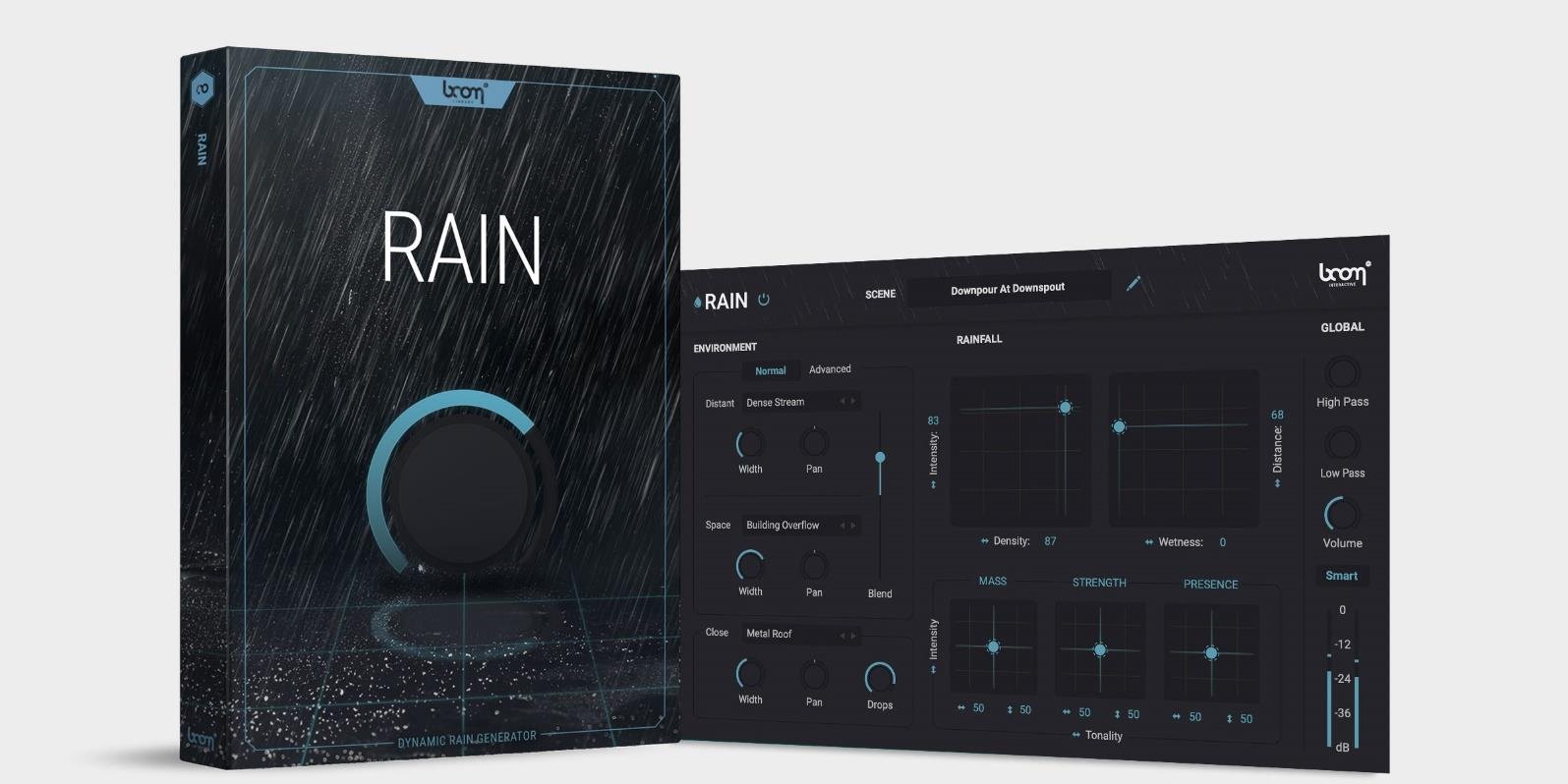
MANUAL
PREFACE
WHAT IS RAIN AND WHAT MAKES IT SPECIAL?
Thanks for choosing RAIN!
RAIN is designed to authentically replicate the sounds of rainfall, allowing users to create immersive rain atmospheres for various audio projects.
Navigating the complexities of rain sound recording can be a daunting challenge. However, with RAIN, you're equipped to effortlessly design an extensive range of rain soundscapes by employing sophisticated synthesis—an innovation that distinguishes it from the common practice of merely layering samples. Say goodbye to the limitations of recording conditions and embrace the boundless possibilities RAIN brings to your creative endeavors.
Craft impeccable atmospheres for film, music, and games, from soothing showers to intense storms. Seamlessly navigate through RAIN’s feature-rich interface, sculpting rain nuances with precision. Experience unprecedented convenience, surpassing previous methods, without the need to sift through countless rain recordings.
- Diverse Rain Layers: Craft various rain atmospheres with the Distant, Space, and Close layers, from subtle murmurs to up-close raindrops.
- Presets and Customization: Choose from preset rain scenes or finetune settings using Width, Pan, Mass, Strength, and Presence controls.
- Density and Intensity: Adjust rain strength effortlessly via an XY pad to create different rain densities and intensities, adding depth and emotion to your soundscapes.
- Wetness and Distance: Shape the perception of wetness and distance within your rain soundscape, enhancing the authenticity of the environment.
Minimum System Requirements
WINDOWS: 8 (64-bit), 8 GB RAM, Intel® Core™ i5 (relatively recent)
MAC: 10.13 (64-bit), 8 GB RAM, Apple Silicon or Intel® Core™ i5 (relatively recent)
Installation
After downloading and opening the installer of RAIN please follow the on-screen instructions to install the application.
THE MANUAL WILL BE COPIED HERE:
WINDOWS: C:\Program Files\BOOM Interactive\RAIN
MAC: /Applications/BOOM Interactive/RAIN
iLok Registration
TIP: Upon the first launch of the application, you will be asked to register RAIN with your iLok account.
A free iLok account can be created under www.ilok.com
During the first start of RAIN after installation, the iLok registration window pops up. RAIN is licensed using the PACE Licensing Platform. You need to have an iLok account to use it, however setting up an iLok account is free. You will find all necessary information on how to setup your account on www.ilok.com. You can either directly authorize your computer (machine authorization) or use a 2nd or higher generation iLok hardware dongle. A second or third generation iLok (iLok2 or iLok3) is a product of PACE that can be purchased at www.ilok.com or from any participating music retailer.
Next: please download the iLok License Manager at www.ilok.com.
After your purchase, you automatically receive an order confirmation from us containing the download link for the installer plus a 30 digits long iLok activation code (e.g. 1234-1234-1234-1234-1234-1234-1234-12).
- Open the iLok License Manager application.
- Either select the menu: License → Redeem Activation Code or click on the small Redeem Activation Code Icon on the upper right of the application.
- You should then copy paste the entire code you received from us into the entry form. Select your iLok as the activation location to immediately activate the license on this iLok and confirm the location.
Watch a step-by-step video tutorial about how to activate your iLok license:
Now you are ready to go!
The product doesn't show up in your DAW?
Not activating the software when first launching the DAW can lead to DAWs putting the plug-in into a "failed to scan" blocklist or blacklist.
In such cases it is usually sufficient to:
- check the DAW's blacklist/blocklist
- remove the plugin from that list
- activate it in the iLok License Manager
- cause a plug-in rescan or restart your DAW
Uninstalling
To remove the plug-in from your system, including its presets and settings, follow the step-by-step guide in our FAQ: How do I uninstall BOOM plug-ins?
If you want to use the plug-in on another computer, deactivate the license in the iLok License Manager first.
Quick Start
RAIN operates as a sound generator, and as such it doesn't require MIDI or audio input to produce sound.
If you're using the Audio Unit (AU) version of the plugin, it falls into the "AU Generators" category, designed specifically for this type of plugin. As an AU Generator, supporting hosts will not suspend RAIN’s audio processing even when there's no active input. It will usually be listed in the "Generators" category in the hosts plugin lists.
The AAX format, which is used by Pro Tools supports similar operation, but it will also allow you to use the plugin on non-instrument tracks. In Pro Tools, it is listed in the "Instruments" category.
In VST3 format, the plugin functions like an audio effect, ensuring compatibility with a wide range of host software. When used on an audio track, RAIN will simply ignore any input, so it should be fine to put it on any empty audio track.
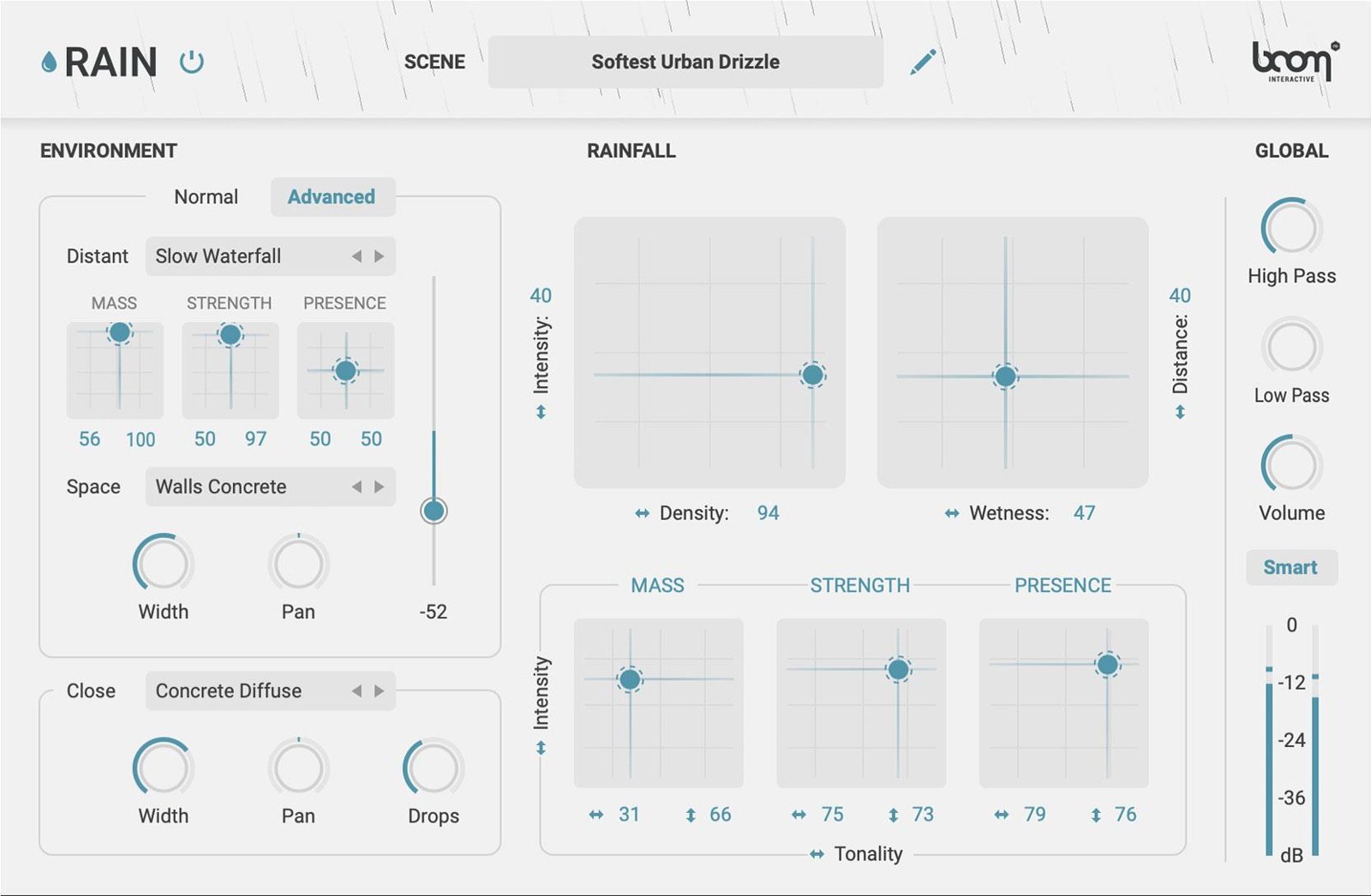
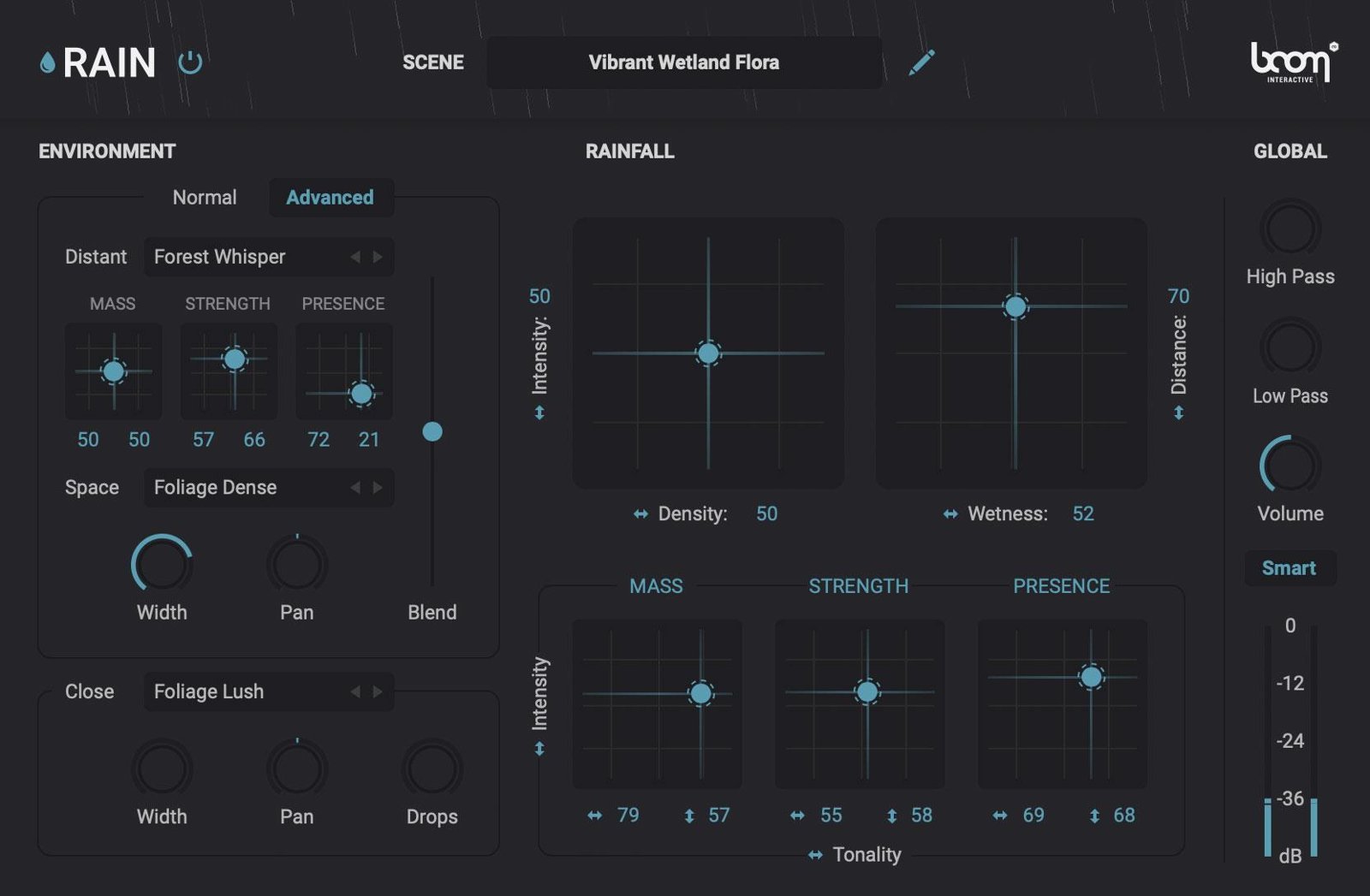
Once you've installed RAIN, instantiate it on your track or channel. By default, it will start to RAIN, and you should be able to hear it immediately. The plugin's graphical user interface (GUI) is divided into 4 distinct sections: HEADER, ENVIRONMENT, RAINFALL, and GLOBAL. The HEADER is located at the top, while ENVIRONMENT, RAINFALL, and GLOBAL are positioned on the left, center, and right sides of the GUI, respectively.
You can skip through the prebuilt SCENEs via the preset browser located at the center of HEADER or go ahead and start sketching your own SCENE by setting up the ENVIRONMENT section according to your liking. Finetune Distance and Tonality via the RAINFALL section before adjusting your output volume and low-/high passing via the GLOBAL section.
UI Overview
RAIN is designed to seamlessly integrate with your operating system's preferences, adapting its interface style to either light or dark mode. This feature ensures that your experience with RAIN remains not only intuitive but also visually comfortable, aligning with your preferred system settings.
LIGHT MODE
DARK MODE
Header

The HEADER occupies 3 general functions.
Logo

Click on the Logo in the top left of the GUI to display the currently installed version of RAIN as well as support contact information and credits.
Bypass

The power button allows you to disable the plugin's processing.
Scene

You can switch between pre-built scenes to quickly set up different rain soundscapes.
Click on the pen icon to rename scenes for easy organization. You can also save and load scenes from files with a simple right-click on the scene name. These straightforward features provide you with practical ways to manage your projects efficiently.
Environment
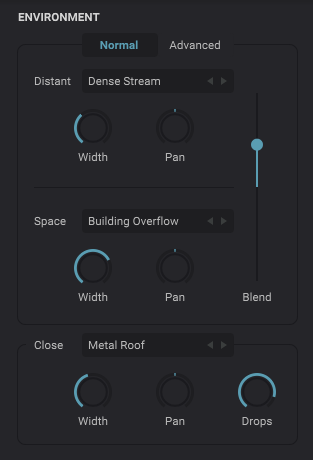
The ENVIRONMENT section offers controls to shape the different layers of the rain sound: Distant, Space and Close.
Distant
You can choose from a selection of 20 distant rain layer styles, such as "Airy Breeze," "Broadband Shower," and "Warm Buzz." These presets can be further adjusted in either Normal or Advanced mode.
Normal Mode: Allows Width and Pan adjustments.
Advanced Mode: Provides controls for Mass, Strength, and Presence adjustments.
TIP: Remember to utilize the "next" and "previous" arrows, particularly when working with the Distant Layer. These arrows offer a quick way to cycle through options, effectively altering the depth perception of your soundscape.
Experiment by toggling through the options to determine which Distant setting best harmonizes with the other layers, ensuring a well-balanced and immersive mix.
Space
This layer offers 15 space layer styles representing different rain environments, like "Street Tarmac", "Metal Tanks" and "Wood Deck." Adjust Width and Pan to suit your scenery.
Blend Control: You can further blend between the Distant and Space layers to achieve the desired mix.
TIP: Enhance the richness of your rain soundscape by exploring Space Layer options such as "Soft Foliage Flutter."
Certain choices offer heightened detail, infusing your scene with additional auditory depth and complexity.
Close
The Close Layer is responsible for simulating the surface on which raindrops fall. It features 20 close layer sources, including surfaces like "Glass Roof", "Concrete", "Wood Thin" and more. The Width and Pan controls, along with the Drops knob for controlling raindrop quantity, provide fine-tuning capabilities.
Rainfall
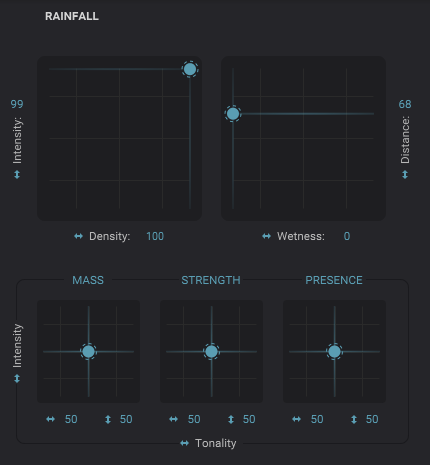
The RAINFALL section focuses on controlling the rain character.
TIP: Note that the Distance matrix control acts as a blending mechanism, transitioning between the two upper layers (Distant, Space) and the smaller framed layer (Close) positioned below.
Use the Blend slider in the ENVIRONMENT section to balance the mix of the Space and Distant layers.
Intensity / Density
Controlled on an XY axis, these parameters adjust the intensity and density of RAINFALL.
Density refers to the quantity of raindrops present, while Intensity characterizes their strength or severity.
Wetness / Distance
Also, on an XY axis, these parameters determine the wetness and perceived distance of RAINFALL.
Wetness pertains to the level of moisture or water content in the drops or surface and Distance relates to the emphasis on either the foreground or background within the rain soundscape.
Tonality
The Mass, Strength, and Presence controls provide tonality on the x-axis and intensity on the y-axis for fine-tuning the tonal characteristics of RAINFALL.
TIP: Utilize a convenient method when adjusting the matrix parameters. Click on any knob or slider and employ the up or down arrows on your keyboard to fine-tune their values. This approach allows you to seamlessly adjust the matrix parameters while concurrently controlling other elements for efficient rain soundscape crafting.
Global

The Global section encompasses overarching controls for the entire rain soundscape.
High & Low Pass
Quickly add a High Pass or Low Pass to make the RAIN sit right where you want it to sit in your mix.
TIP: Leverage the Low Pass (LP) feature to effortlessly craft indoor rain settings, perfect for establishing cozy indoor scenes.
On the other hand, the High Pass (HP) control proves valuable in fashioning gentle drizzle rain, allowing you to infuse the soundscape with intricate detail and heightened density.
Volume
Below the filter section you can adjust the output Volume. RAIN incorporates a transparent limiter to maintain control over the "Close Drops" from the Close layer, especially when their volume is elevated. Adjusting the volume downward not only effectively manages the balance but also enhances the dynamic range of your rain soundscape.
Smart
The Smart toggle button, enabled by default, is designed to intelligently manage the wide dynamic range between subtle trickles and torrential downpours. When activated, this feature ensures a controlled audio output that maintains consistency across rain intensities.
However, should you opt for a more authentic representation of dynamic range, you can disable the Smart mode.
CAUTION: Deactivating Smart mode may result in significant output level differences between gentle drizzles and heavy rainfalls.
Level Meter
At the bottom you will find a simple Level Meter that helps to keep the signal within the desired range. The displayed range is -48dB, with -24dB at the centre, and 0dB at the top.
Use Cases
RAIN opens a world of creative possibilities across various domains, enhancing your projects with authentic rain soundscapes. Here are some examples to inspire your rain sound design:
In the realm of film and television, immerse viewers in the ambience of your scenes by crafting realistic rain backgrounds. From subtle drizzles to intense storms, RAIN lets you tailor rain sounds to match diverse cinematic environments. Enhance drama, set moods, and evoke emotions with rain that complements your visuals.
As a musician you can add depth and emotion to your musical compositions with custom rain soundscapes. Whether you're aiming for introspective ballads, energetic pop tracks, or ambient soundscapes, RAIN infuses your music with rain's evocative qualities, creating unique sonic textures.
If you are a game audio designer, RAIN enables you to immerse players in virtual worlds with lifelike rain environments. You can tailor rain soundscapes to fit various game settings, whether they are urban cityscapes, dense forests, or eerie dungeons. What sets RAIN apart is its capacity to meticulously construct multiple layers of rain, a challenging feat when working with rain recordings. This precision allows you to effortlessly design numerous variations, enhancing both realism and player engagement in dynamic weather systems within your game.
RAIN is also a precision tool for sound artists, recreating the authentic sounds of rain, from delicate window droplets to intricate puddle splashes. This level of detail not only enhances static soundscapes but also brings interactivity to art installations. With the modulation control of RAIN, interactive installations come alive, allowing audiences to engage dynamically with the rain's auditory narrative.
Amid these diverse applications, RAIN empowers creators to explore the full potential of rain soundscapes. It unites realism with imagination, redefining audio possibilities and encouraging users to delve into experimentation. As a tool that transcends limitations, RAIN infuses authenticity into creative processes, offering an extraordinary medium for communicating emotions and stories.
End-User License Agreement
This license agreement is a single-user license agreement. For multi-user licenses and multi-user discounts, please contact us via service@boomlibrary.com.
The following End User License Agreement ("EULA") represents the contractual conditions between you ("LICENSEE" or “You”) and BOOM Library ("BOOM", visit www.boomlibrary.com/about for the official legal company details and address) for the use of audio software plug-ins including related media, documentation (e.g. manuals) and other documents and materials (e.g. presets) manufactured by BOOM ("SOFTWARE").
BOOM offers two types of SOFTWARE:
- Software / audio-plug-ins with which you can process any audio data that you provide (“AUDIO PROCESSING SOFTWARE”), e.g. any type of DSP, compressor, reverb, delay, etc.
- Software / audio-plug-ins with which you can create new original sounds and / or new original sound sources and / or new audio data, not only processing audio data from outside, but also generating new audio source data (“AUDIO CREATION SOFTWARE”), e.g. any type of synth, AI audio generation, etc.
The SOFTWARE you have purchased is an AUDIO CREATION SOFTWARE. Therefore the licensing and usage rules of AUDIO CREATION SOFTWARE apply to this EULA.
By installing and by registering the SOFTWARE on your computer, you declare yourself in agreement with these conditions. If you do not agree with these conditions, you are not allowed to install the SOFTWARE. Copyright laws and international copyright treaties, as well as other intellectual property laws and treaties protect the content. All rights not expressly granted to LICENSEE hereunder are reserved by BOOM.
Section 1 – Introduction:
- What You Get:
- You get to install the SOFTWARE on up to two (2) computers that you, only, use. They can be your computer in an edit bay and a laptop for the field, or your computer at work (or school) and your computer at home, etc.
- Please note that you need a sequencer software to run our SOFTWARE which is not included in this license.
- You can copy the SOFTWARE only once, for the sole purpose of making a backup copy.
- If you need licenses for multiple people or more workstations, you will need to get a multi-user license from us. Please contact us for multi-user pricing.
- If you are an educator and need a license for your lab, please contact us for educational pricing.
- For all AUDIO CREATION SOFTWARE: you have the right to export, render out, re-record or otherwise save any type of sound, noise, music, pad (“WORK”) processed and / or created with our AUDIO CREATION SOFTWARE and its presets only as part of any video, game, film, or any other type of linear or adaptive final media production (“MEDIA PROJECT”), not including audio only projects (see point 2.c. “What You Don’t Get”). The usage rights for MEDIA PROJECTS also include MEDIA PROJECTS that you didn’t do (e.g. MEDIA PROJECTS of customers you work for), if the WORKS are made from the copy of the SOFTWARE you have on your computer and used as per our EULA.
- MEDIA PROJECTs are defined as any type of traditional entertainment or media productions that combine sound, other audio (e.g. music or voice over), graphics (e.g. video, film, pictures) and are in some way synchronized or embedded in a final end user product.
- AUDIO PROJECTs are defined as any MEDIA PROJECT and / or any type of audio only projects (not combined with any other nonaudio media component like graphics), stand-alone audio / sound products, sound effects only, audio data processing, audio data training, hardware installations and products (toys, medical devices, any hardware with onboard sounds). This EULA does not cover usage of the SOFTWARE for AUDIO PROJECTS.
If in doubt if a production is a MEDIA PROJECT or an AUDIO PROJECT, please contact us.
- What You Don’t Get:
- You don’t get to make any other copies of the SOFTWARE.
- Please don’t share, crack or pirate our SOFTWARE – we are a small company, and unlicensed copies hurt our ability to make the SOFTWARE better for you and bring you new products in the future.
- For all AUDIO CREATION SOFTWARE: you cannot use our AUDIO CREATION SOFTWARE to create WORKS for sound effect libraries, sample libraries, music libraries or machine learning (“NEW AUDIO PRODUCTS”), neither commercial, nor non-commercial, since this would hurt our business.
- If you want to create NEW AUDIO PRODUCTS using our AUDIO CREATION SOFTWARE, you need an “AUDIO DEVELOPER LICENSE” from us, please contact us for this.
Section 2 – Ownership:
- The enclosed SOFTWARE and related instructions are licensed (not sold) to you, and BOOM retains all ownership interests and intellectual property rights in the SOFTWARE.
Section 3 – Software License:
- BOOM grants you a nonexclusive, nontransferable license to (i) install and use one copy of the SOFTWARE on up to no more than two (2) computers both of which must be owned and used by you and (ii) make one copy of the SOFTWARE for back-up or archival purposes only.
- The SOFTWARE cannot be installed on a network server, without contacting us and asking for a Network License and / or Multiuser License required for each workstation served on such network.
You may not:
- copy (other than for a second computer owned and used by you and for back-up purposes), disclose, publish, export, distribute, rent, lease or sublicense
- remove any BOOM trademarks or copyright notices from;
- modify, translate or prepare derivative works of;
- use in a computer-based services business or publicly display visual output of;
- transmit by audio, digital or other electronic means or post software on any file-sharing site or
- reverse engineer, decompile or disassemble all or any portion of the SOFTWARE in any form, except as expressly licensed herein.
Section 4 – Audio Rights (Rights to the WORKS):
- For AUDIO CREATION SOFTWARE, this EULA grants you the right to produce WORKs using our SOFTWARE by any means and for any type of WORK. The WORKS can be created and / or processed using the presets included in the SOFTWARE. This license includes the worldwide, royalty-free, non-exclusive right to combine or sync the WORKS created and / or processed with our SOFTWARE with any type of MEDIA PROJECT but does not cover and AUDIO PROJECTS.
For these above-mentioned rights, you don’t need to:
- Pay any additional license fees to BOOM or any third-party other than the purchasing cost of this license;
- Obtain additional clearances or permissions; or
- Provide source attribution to BOOM.
This license includes mechanical, synchronization, public performance and broadcast rights.
Section 5 – Limitations:
- This license expressly forbids any unauthorized inclusion of the SOFTWARE or parts of the software code into applications or hardware products that you manufacture for your clients.
- This license also forbids any stand-alone re-distribution method of our SOFTWARE, through any means, including but not limited to, re-selling, trading, sharing, re-compiling, mixing, processing, isolating, or embedding into other software or hardware of any kind, for the purpose of re-recording or reproduction as part of any free or commercial library of musical and/or sound effect samples and/or articulations, or any form of musical sample or sound effect sample playback system or device.
- All licenses and rights under this license are nontransferable, which means that You may not sell, gift, or in any way allow another individual or business the rights obtained pursuant to this license except to Your affiliates and successors. If LICENSEE is an entity, or a business being acquired by another business or organized under another business name or tax entity, all licenses and rights under this AGREEMENT may be transferred provided that number of users and workstations has not increased, and BOOM is notified of this transfer in writing within 30 days.
Section 6 – User Responsibility:
- LICENSEE is responsible for installation, management and operation of the SOFTWARE. Further, LICENSEE agrees to indemnify, hold harmless and defend BOOM from and against all claims or lawsuits, including attorneys' fees, that arise or result from any use or distribution of the SOFTWARE not expressly authorized in this EULA.
- Warranty. BOOM warrants the SOFTWARE media (e.g. download) to be free from defects in materials and workmanship for a period of sixty (60) days from the date of purchase. BOOM will replace any such defective media returned to BOOM during such warranty period, provided such defect is not the result of improper use or neglect, or if BOOM is unable to do so, it will refund your price for such defective SOFTWARE. Replacement (or refund) is the exclusive remedy for any such defects, and BOOM shall have no liability for any other damages.
- THE FOREGOING WARRANTY IS IN LIEU OF ALL OTHER EXPRESS OR IMPLIED WARRANTIES, INCLUDING ANY WARRANTIES OF MERCHANTABILITY OR FITNESS FOR A PARTICULAR PURPOSE. IN NO EVENT WILL BOOM BE LIABLE FOR ANY KIND OF SPECIAL, INCIDENTAL OR CONSEQUENTIAL DAMAGES, INCLUDING LOST PROFITS, EVEN IF BOOM HAS KNOWLEDGE OF SUCH POTENTIAL LOSS OR DAMAGE.
Section 7 – Termination and reservation of right:
- This EULA is effective until terminated. You may terminate it at any time by destroying the SOFTWARE, including all computer programs and documentation, and erasing any copies residing on computer equipment. This EULA also will terminate if you do not comply with any terms or conditions of this EULA. Upon such termination you agree to destroy the SOFTWARE and erase all copies residing on computer equipment.
- This EULA may be subject to alterations, due to changes in law, new distribution channels, acquisition of BOOM by a third-party entity, new rules applied by third party software providers on whom BOOM’s SOFTWARE rely on. BOOM warrants that any such alternation will happen in the best interest of the LICENSEE and BOOM and that BOOM will inform LICENSEE in due time and in written form of any such changes.
Section 8 – Agreement:
- This EULA expresses the entire understanding between you and BOOM and supersedes all other oral or written communications relating to the SOFTWARE. This EULA shall be governed and construed under the laws of the Federal Republic of Germany and subject to the exclusive jurisdiction of the courts therein.
- Some content included in BOOM’s SOFTWARE, as well as any associated intellectual property rights and titles, belongs to third parties. This content may be protected by copyright or other intellectual property laws and treaties and may be subject to terms and conditions from the third party providing the content.
- If any section of this EULA should be or become invalid, either completely or in part, this shall not affect the validity of the remaining sections. The parties agree that they make good effort to replace the invalid section with a valid regulation which comes as close as possible to the purpose originally intended.
APPENDIX A: SOFTWARE LICENSE AGREEMENTS OF THIRD PARTIES
I - Inno Setup License:
Except where otherwise noted, all of the documentation and software included in the Inno Setup package is copyrighted by Jordan Russell. Copyright (C) 1997-2013 Jordan Russell. All rights reserved. Portions Copyright (C) 2000-2013 Martijn Laan. All rights reserved.
This software is provided "as-is," without any express or implied warranty. In no event shall the author be held liable for any damages arising from the use of this software.
Permission is granted to anyone to use this software for any purpose, including commercial applications, and to alter and redistribute it, provided that the following conditions are met:
- All redistributions of source code files must retain all copyright notices that are currently in place, and this list of conditions without modification.
- All redistributions in binary form must retain all occurrences of the above copyright notice and web site addresses that are currently in place (for example, in the About boxes).
- The origin of this software must not be misrepresented; you must not claim that you wrote the original software. If you use this software to distribute a product, an acknowledgment in the product documentation would be appreciated but is not required.
- Modified versions in source or binary form must be plainly marked as such, and must not be misrepresented as being the original software.
Jordan Russell, jr-2010 AT jrsoftware.org, http://www.jrsoftware.org/
II - Roboto Fonts
This application makes use of the Roboto fonts authored by Christian Robertson and made available through Google Fonts (fonts.google.com) under the terms of the Apache Software License v2.
Version 2.0, January 2004, http://www.apache.org/licenses/
- Grant of Copyright License: Subject to the terms and conditions of this License, Apache hereby grants to You a perpetual, worldwide, non-exclusive, no-charge, royalty-free, irrevocable copyright license to reproduce, prepare Derivative Works of, publicly display, publicly perform, sublicense, and distribute the Work and such Derivative Works in Source or Object form.
- Trademarks: This License does not grant permission to use the trade names, trademarks, service marks, or product names of the Licensor, except as required for reasonable and customary use in describing the origin of the Work and reproducing the content of the NOTICE file.
- Disclaimer of Warranty: Unless required by applicable law or agreed to in writing, Licensor provides the Work (and each Contributor provides its Contributions) on an "AS IS" BASIS, WITHOUT WARRANTIES OR CONDITIONS OF ANY KIND, either express or implied, including, without limitation, any warranties or conditions of TITLE, NON-INFRINGEMENT, MERCHANTABILITY, or FITNESS FOR A PARTICULAR PURPOSE. You are solely responsible for determining the appropriateness of using or redistributing the Work and assume any risks associated with Your exercise of permissions under this License.
- Limitation of Liability: In no event and under no legal theory, whether in tort (including negligence) contract, or otherwise, unless required by applicable law (such as deliberate and grossly negligent acts) or agreed to in writing, shall any Contributor be liable to You for damages, including any direct, indirect, special, incidental, or consequential damages of any character arising as a result of this License or out of the use or inability to use the Work (including but not limited to damages for loss of goodwill, work stoppage, computer failure or malfunction, or any and all other commercial damages or losses), even if such Contributor has been advised of the possibility of such damages.
III - FFTConvolver
Copyright (c) 2017 HiFi-LoFi
Permission is hereby granted, free of charge, to any person obtaining a copy of this software and associated documentation files (the "Software"), to deal in the Software without restriction, including without limitation the rights to use, copy, modify, merge, publish, distribute, sublicense, and/or sell copies of the Software, and to permit persons to whom the Software is furnished to do so, subject to the following conditions:
The above copyright notice and this permission notice shall be included in all copies or substantial portions of the Software.
THE SOFTWARE IS PROVIDED "AS IS", WITHOUT WARRANTY OF ANY KIND, EXPRESS OR IMPLIED, INCLUDING BUT NOT LIMITED TO THE WARRANTIES OF MERCHANTABILITY, FITNESS FOR A PARTICULAR PURPOSE AND NON-INFRINGEMENT. IN NO EVENT SHALL THE AUTHORS OR COPYRIGHT HOLDERS BE LIABLE FOR ANY CLAIM, DAMAGES OR OTHER LIABILITY, WHETHER IN AN ACTION OF CONTRACT, TORT OR OTHERWISE, ARISING FROM, OUT OF OR IN CONNECTION WITH THE SOFTWARE OR THE USE OR OTHER DEALINGS IN THE SOFTWARE.
IV - PFFFT : a Pretty Fast FFT
Copyright (c) 2013 Julien Pommier (pommier@modartt.com )
Based on original fortran 77 code from FFTPACKv4 from NETLIB, authored by Dr Paul Swarztrauber of NCAR, in 1985. As confirmed by the NCAR fftpack software curators, the following FFTPACKv5 license applies to FFTPACKv4 sources. My changes are released under the same terms.
Copyright (c) 2004 the University Corporation for Atmospheric Research ("UCAR"). All rights reserved. Developed by NCAR's Computational and Information Systems Laboratory, UCAR, www.cisl.ucar.edu. Redistribution and use of the Software in source and binary forms, with or without modification, is permitted provided that the following conditions are met:
- Neither the names of NCAR's Computational and Information Systems Laboratory, the University Corporation for Atmospheric Research, nor the names of its sponsors or contributors may be used to endorse or promote products derived from this Software without specific prior written permission.
- Redistributions of source code must retain the above copyright notices, this list of conditions, and the disclaimer below.
- Redistributions in binary form must reproduce the above copyright notice, this list of conditions, and the disclaimer below in the documentation and/or other materials provided with the distribution.
THIS SOFTWARE IS PROVIDED "AS IS", WITHOUT WARRANTY OF ANY KIND, EXPRESS OR IMPLIED, INCLUDING, BUT NOT LIMITED TO THE WARRANTIES OF MERCHANTABILITY, FITNESS FOR A PARTICULAR PURPOSE AND NON-INFRINGEMENT. IN NO EVENT SHALL THE CONTRIBUTORS OR COPYRIGHT HOLDERS BE LIABLE FOR ANY CLAIM, INDIRECT, INCIDENTAL, SPECIAL, EXEMPLARY, OR CONSEQUENTIAL DAMAGES OR OTHER LIABILITY, WHETHER IN AN ACTION OF CONTRACT, TORT OR OTHERWISE, ARISING FROM, OUT OF OR IN CONNECTION WITH THE SOFTWARE OR THE USE OR OTHER DEALINGS WITH THE SOFTWARE.
V - Steinberg VST License
VST PlugIn Technology by Steinberg Media Technologies and VST PlugIn Interface Technology by Steinberg Media Technologies GmbH.
LIMITATION OF LIABILITY
- Subject to the provisions in the following sub-sections, Steinberg shall only be liable, irrespective of the legal grounds, for damages caused by the intentional or grossly negligent conduct of Steinberg, its legal representatives, managerial employees or any other vicarious agents. In the case of damage caused by the grossly negligent conduct of any other vicarious agents, the liability shall be limited to those damages which must typically be expected within the scope of an agreement such as the present one. Any further liability other than as permitted under this agreement shall be excluded.
- Any liability of Steinberg for damages arising from violation of life, body and health, from the assumption of a guarantee or from a procurement risk as well as Steinberg's liability for damages pursuant to the Product Liability Act (Produkthaftungsgesetz) shall remain unaffected.
- To the extent the liability of Steinberg is excluded pursuant to the subsections of these provisions, this shall also apply to the benefit of Steinberg's employees in the event the Licensee files any claims directly against them.
PRODUCT WARRANTY
- Steinberg licences the VST PlugIn Interface Technology on an "AS IS" basis. Steinberg makes no warranties, express or implied, including without limitation the implied warranties of merchantability and fitness for a particular purpose, regarding the VST PlugIn Interface Technology or operation and use in combination with the Licensee’s program. Neither the Licensee, its employees, agents or Distributors have any right to make any other representation, warranty or promise with respect to the VST PlugIn Interface Technology.
- In no event shall Steinberg be liable for incidental, indirect or consequential damages arising from the use, or distribution of the VST PlugIn Interface Technology by the Licensee, whether theory of contract, product liability or otherwise. All claims for indemnification for losses by the Licensee itself or by third parties shall be excluded.
- Steinberg may in its sole discretion discontinue the distribution of the current VST PlugIn SDK and/or release improved versions of the Licensed Software Developer Kit but offers no commitment whatsoever those releases will occur at any time or for anybody.
INFRINGEMENT
- Steinberg represents and warrants that, as of the date of this Agreement, it is not aware of any claim or action alleging that VST, the VST PlugIn Interface Technology, or the content of the Licensed Software Developer Kit infringes any third party intellectual property right.
- Steinberg, however, disclaims any obligation of defense or indemnify of the Licensee or its customer with respect to any such claim or action, or otherwise arising out of this agreement. Steinberg shall have no liability arising out of any such actual or alleged intellectual property infringement. The Licensee, however, shall promptly notify Steinberg, in writing, of each such infringement claim of which the Licensee becomes aware. Steinberg may defend the Licensee against such claims. In such case, the Licensee is obligated to duly support Steinberg’s defense.
This is a software of BOOM Library.
All other product names, brands and trademarks, mention of which in this document and the software is for identification purposes only and does not imply affiliation or endorsement, are the property of their respective owners.

BOOM Library
Visit www.boomlibrary.com/about for the official company address.
www.boomlibrary.com
© BOOM Library, . All Rights Reserved.