MANUAL
PREFACE
WHAT IS RECENTER AND WHAT MAKES IT SPECIAL?
Fix poorly aimed stereo recordings!
Have you ever worked with stereo material that was not centered correctly? Pointing a stereo microphone a hundred percent accurately onto a sound source gets harder the further away the source is. RECENTER continuously analyzes the directionality of a stereo or M/S signal and rotates it to a given target angle in real-time - without narrowing the stereo width.
RECENTER is a stereo processor that rotates an incoming stereo signal to the center or a given angle without altering the stereo width. Having the incoming signal centered, you can narrow or widen the stereo image within RECENTER. For a better low frequency control you can mono the original signal below a set frequency. A multi-band option is available for processing more complicated signals.
Easily correct any stereo recording where the microphone angle was off, dynamically center a vocal artist that moved on stage during the performance or center and reposition whooshes, drive-bys and other directional effects. No more need for time-consuming corrective pan automation!
From the necessary quick fix to detailed stereo adjustment – RECENTER is at your service.
Minimum System Requirements
WINDOWS: Windows 8 (64-bit), 8 GB RAM, Intel® Core™ i5 (relatively recent), OpenGL 2.1 capable GPU
MAC: macOS 10.13 (64-bit), 8 GB RAM, Apple Silicon or Intel® Core™ i5 (relatively recent), OpenGL 2.1 capable GPU
Installation
After downloading and opening the installer of RECENTER please follow the on-screen instructions to install the application.
THE MANUAL WILL BE COPIED HERE:
WINDOWS: C:\Program Files\BOOM Interactive\Recenter
MAC: /Applications/BOOM Interactive/Recenter
iLok Registration
Upon the first launch of the application, you will be asked to register RECENTER with your iLok account.
A free iLok account can be created under www.ilok.com
During the first start of RECENTER after installation, the iLok registration window pops up. RECENTER is licensed using the PACE Licensing Platform. You need to have an iLok account to use it, however setting up an iLok account is free. You will find all necessary information on how to setup your account on www.ilok.com. You can either directly authorize your computer (machine authorization) or use a 2nd or higher generation iLok hardware dongle. A second or third generation iLok (iLok2 or iLok3) is a product of PACE that can be purchased at www.ilok.com or from any participating music retailer.
Next: please download the iLok License Manager at www.ilok.com.
After your purchase, you automatically receive an order confirmation from us containing the download link for the installer plus a 30 digits long iLok activation code (e.g. 1234-1234-1234-1234-1234-1234-1234-12).
- Open the iLok License Manager application.
- Either select the menu: Licenses → Redeem Activation Code or click on the small Redeem Activation Code Icon on the upper right of the application.
- You should then copy paste the entire code you received from us into the entry form. Select your iLok as the activation location to immediately activate the license on this iLok and confirm the location.
Watch a step-by-step video tutorial about how to activate your iLok license:
Now you are ready to go!
The product doesn't show up in your DAW?
Not activating the software when first launching the DAW can lead to DAWs putting the plug-in into a "failed to scan" blocklist or blacklist.
In such cases it is usually sufficient to:
- check the DAW's blacklist/blocklist
- remove the plugin from that list
- activate it in the iLok License Manager
- cause a plug-in rescan or restart your DAW
Uninstalling
To remove the plug-in from your system, including its presets and settings, follow the step-by-step guide in our FAQ: How do I uninstall BOOM plug-ins?
If you want to use the plug-in on another computer, deactivate the license in the iLok License Manager first.
Quick Start
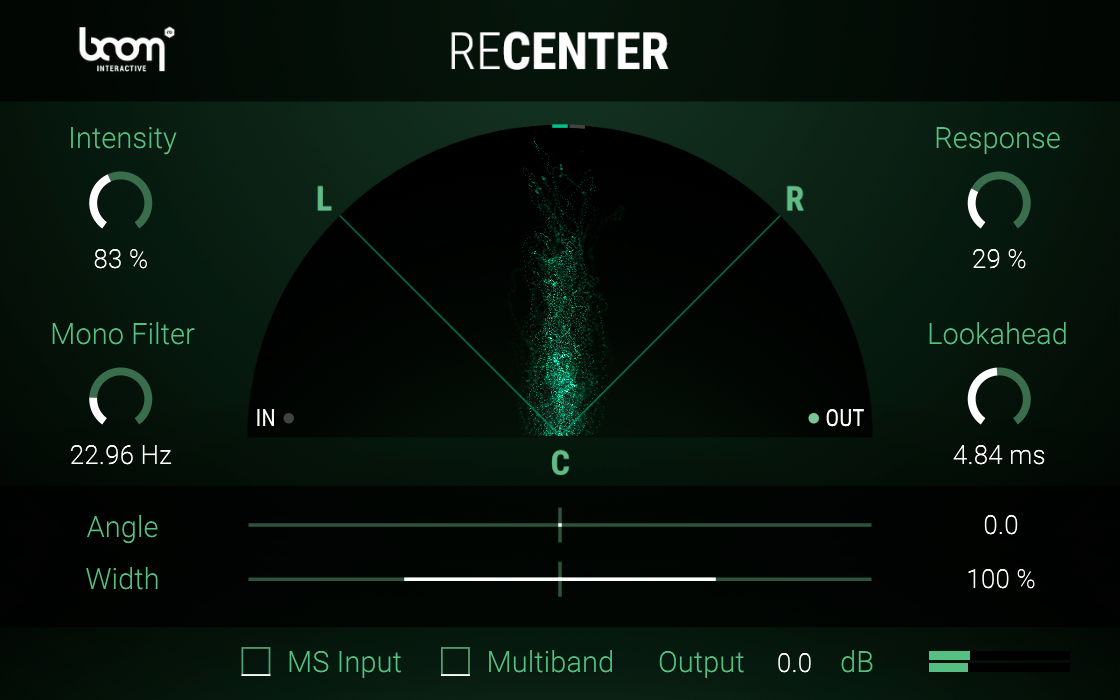
Create a stereo track and, within it, place a sound which needs to be centered. Add RECENTER as insert effect to said track. Depending on the type of source sound, your audio may now already sound perfectly centered while retaining its initial stereo feel thanks to RECENTER’s automatic real-time processing. The stereo monitor in the middle will give you a good idea of where your signal is placed within the stereo image. If it needs further adjustment, the surrounding controls offer additional tweaking options, which will be explained in more detail here.
GUI Overview
Header & Logo

Clicking on either logo will open a little "About" window, showing the plug-in version and the people involved in the development.
Stereo Monitor
The Stereo Monitor displays your signal’s current placement within the stereo spectrum, giving you instant visual feedback of what can be heard.
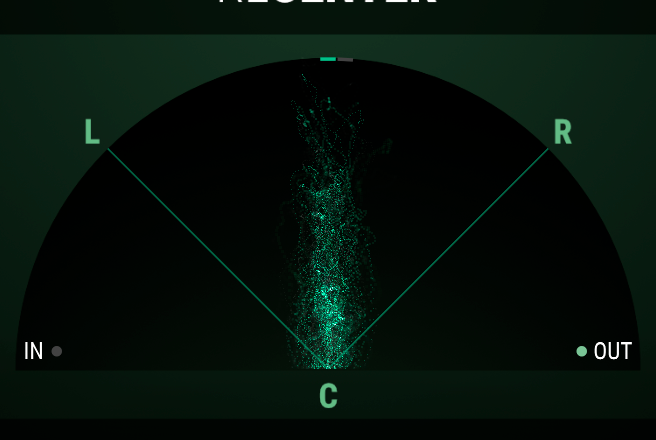
In this example, the processed sound (OUT) is displayed as active, while the source signal (IN) is greyed out and in the background. That way, you can quickly make accurate comparisons between the original sound and the result.
IN / OUT Toggles
Choose which signal you’d like to view primarily:

IN: View the unaltered, original signal. RECENTER often mirrors the sound’s movement in high detail visually, making it easier for you to identify the issue.

OUT (Default): Displays the processed end result, including angle and width adjustments. Tailor the output signal exactly to your need with this visual aid.
Upper Controls
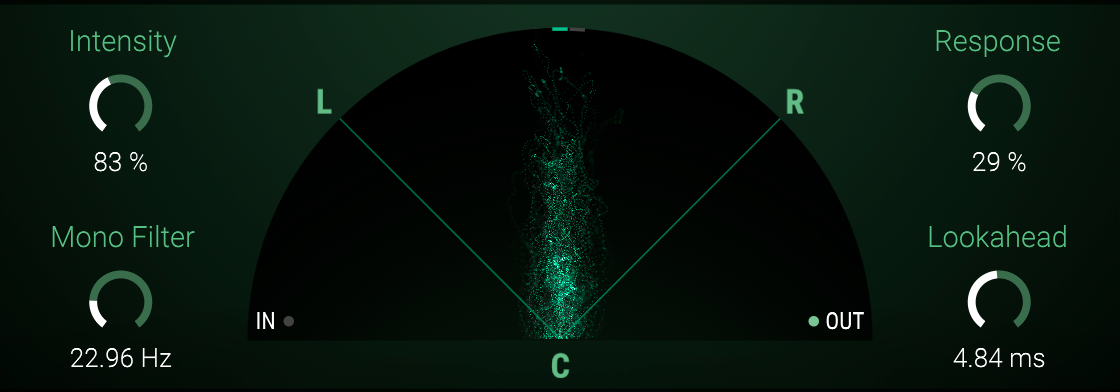
Intensity
Specifies the amount of correction. At 100% the plug-in will work at full capacity to center the stereo signal. Go above 100% to over-compensate and force the correct alignment where necessary.
Response
Determines the speed at which the plug-in corrects the signal. Lower values cause less artifacts, whereas higher values respond faster, as the Stereo Monitor will also show.
Mono Filter
If needed, the Mono Filter reduces all audio to mono below a certain threshold, which can be adjusted with this control. Turning it all the way down disables the filter.
Lookahead
Controls how far ahead the incoming signal is analyzed. Values above 0ms introduce latency but usually yield more robust results.
Angle & Width

These two sliders let you make final adjustments to the already centered signal.
Angle
Rotates the signal to an angle you specify. This is 0° by default (center).
Width
Expands or reduces the final stereo width.
| Value | Result |
|---|---|
| 0% | Mono |
| 100% | Original stereo width |
| 200% | Highly widened stereo |
TIP: By using negative values, you can invert the stereo image.
Bottom Panel

MS Input
If you are working with a Mid-Side recording, activate this checkbox to enable automatic MS decoding. The signal will be converted to LR before after processing.
Multiband
Toggles multiband processing. While slightly increasing the plug-in’s CPU load, it can yield better results, especially when the signal features different directionality in different frequency ranges. Multiband mode operates with four frequency bands:
| Band | Frequency Range |
|---|---|
| 1 | 0Hz – 150Hz |
| 2 | 150Hz – 1,200Hz |
| 3 | 1,200Hz – 5,500Hz |
| 4 | 5,500Hz – 20,000Hz |
Output
Adjusts the final output volume of your signal.
Tips and Tricks
Perceived vs. Technical Center
The technical center (as seen in the Stereo Monitor) may sometimes differ from the perceived center (what you hear). In that case, lower the Stereo Width and use the Angle parameter to pinpoint and move the signal to the perceived center.
You can also try modifying Intensity to over-/undercompensate for the detected source direction.
Headphones vs. Speakers
Most applications require the signal to sound correct on both headphones and speakers. If possible, cross-check the result frequently on both systems, as factors like perceived center and stereo width usually vary depending on your monitoring device.
Mono Filter
Using the Mono Filter helps to get punchier and more defined low frequency responses.
Multiband
While Multiband mode utilizes more processing power, it is not always the best choice. Use your ears and best judgement to determine which option fits your input signal best.
End-User License Agreement
This license agreement is a single-user license agreement. For multi-user licenses and multi-user discounts, please contact us via service@boomlibrary.com
The following End User License Agreement ("EULA") represents the contractual conditions between you ("Licensee" or “you”) and BOOM Library ("BOOM", visit www.boomlibrary.com/about for the official legal company details and address) for the use of audio software plug-ins including related media, documentation (e.g. manuals) and other documents and materials (e.g. presets) manufactured by BOOM ("audio-plug-ins" or “software”). By installing and by registering the software on your computer, you declare yourself in agreement with these conditions. If you do not agree with these conditions, you are not allowed to install the software. Copyright laws and international copyright treaties, as well as other intellectual property laws and treaties protect the content. All rights not expressly granted to Licensee hereunder are reserved by BOOM.
SECTION 1 – INTRODUCTION:
- What You Get:
- You get to install the software on up to two computers that you, only, use. They can be your computer in an edit bay and a laptop for the field, or your computer at work (or school) and your computer at home, etc.
- Please note that you need a sequencer software to run our audio plug-ins which is not included in this license.
- You can copy the software only once, for the sole purpose of making a backup copy
- If you need licenses for multiple people or more workstations, you will need to get a multi-user license from us. Please contact us for multi-user pricing.
- If you are an educator and need a license for your lab please contact us for educational pricing.
- You can export, render out, re-record or otherwise save any type of sound, noise, music, pad (“work”) created with our audio plug-in and its presets and use it as part of any video, game, ,audio library or other media production (“media projects”), even other people’s media projects that you didn’t do, if the works are made from the copy of the audio plug-in you have on your computer and used as per our End User License Agreement.
- What You Don’t Get:
- You don’t get to make any other copies of the audio plug-in.
- Please don’t share our audio plug-ins on the internet – we are a small company, and unlicensed copies hurt our ability to make the software better for you and bring you new products in the future.
SECTION 2 – OWNERSHIP:
The enclosed audio plug-ins and related instructions are licensed (not sold) to you, and BOOM retains all ownership interests and intellectual property rights in the Software.
SECTION 3 – SOFTWARE LICENSE:
- BOOM grants you a nonexclusive, nontransferable license to (i) install and use one copy of the Software on up to no more than two (2) computers both of which must be owned and used by you and (ii) make one copy of the Software for back-up or archival purposes only.
- The software cannot be installed on a network server, without contacting us and asking for a Network license required for each workstation served on such network. You may not:
- copy (other than for a second computer owned and used by you and for back-up purposes), disclose, publish, export, distribute, rent, lease or sublicense
- remove any BOOM trademarks or copyright notices from;
- modify, translate or prepare derivative works of;
- use in a computer-based services business or publicly display visual output of;
- transmit by audio, digital or other electronic means or post software on any file-sharing site or
- reverse engineer, decompile or disassemble all or any portion of the audio plug-in in any form, except as expressly licensed herein.
SECTION 4 – AUDIO RIGHTS (RIGHTS TO THE WORKS):
- This license grants the rights to produce new works using our audio plug-in. Such new works can be created using the presets included in the audio plug-in. This license includes the worldwide, royalty-free, non-exclusive right to combine or sync works created with our audio plug-in into media projects without
- paying any additional license fees to BOOM or any third-party other than the purchasing cost of this license;
- obtaining additional clearances or permissions; or
- providing source attribution to BOOM.
- This license includes mechanical, synchronization, public performance and broadcast rights.
- This license grants the worldwide and limited right to Licensee to use, re-record, duplicate, incorporate, modify, adapt, embed, and exploit all or a portion of the works created with our audio plug-ins without further payment to BOOM or any third party (royalty free). The media projects that can use the works created under this license using our audio plug-ins need to contain an additional element: i.e. voice, music, image, etc. Examples of allowed uses are, without limitation, inclusion in radio programs, podcasts, mobile apps, television broadcasts, film soundtrack, music albums, PowerPoint presentations, sound effects libraries, software instruments, websites, advertising, multi-media presentations, video games and other similar products.
SECTION 5 – LIMITATIONS:
- This license expressly forbids any unauthorized inclusion of the software or parts of the software code into applications or hardware products that you manufacture for your clients.
- This license also forbids any stand-alone re-distribution method of our software, through any means, including but not limited to, re-selling, trading, sharing, re-compiling, mixing, processing, isolating, or embedding into other software or hardware of any kind.
- All licenses and rights under this license are nontransferable, which means Licensee may not sell, gift, or in any way allow another individual or business the rights obtained pursuant to this license except to Licensee’s affiliates and successors. In the event that the Licensee is acquired by another business or organized under another business name or tax entity, all licenses and rights under this AGREEMENT may be transferred provided that number of users and workstations has not increased, and BOOM is notified of this transfer in writing within 30 days.
SECTION 6 – USER RESPONSIBILITY:
- Licensee is responsible for installation, management and operation of the Software. Further, Licensee agrees to indemnify, hold harmless and defend BOOM from and against all claims or lawsuits, including attorneys' fees, that arise or result from any use or distribution of the Software not expressly authorized in this Agreement.
- Warranty. BOOM warrants the Software media (e.g. download) to be free from defects in materials and workmanship for a period of sixty (60) days from the date of purchase. BOOM will replace any such defective media returned to BOOM during such warranty period, provided such defect is not the result of improper use or neglect, or if BOOM is unable to do so, it will refund your price for such defective Software. Replacement (or refund) is the exclusive remedy for any such defects, and BOOM shall have no liability for any other damages.
- THE FOREGOING WARRANTY IS IN LIEU OF ALL OTHER EXPRESS OR IMPLIED WARRANTIES, INCLUDING ANY WARRANTIES OF MERCHANTABILITY OR FITNESS FOR A PARTICULAR PURPOSE. IN NO EVENT WILL BOOM BE LIABLE FOR ANY KIND OF SPECIAL, INCIDENTAL OR CONSEQUENTIAL DAMAGES, INCLUDING LOST PROFITS, EVEN IF BOOM HAS KNOWLEDGE OF SUCH POTENTIAL LOSS OR DAMAGE.
SECTION 7 – TERMINATION AND RESERVATION OF RIGHT:
- This Agreement is effective until terminated. You may terminate it at any time by destroying the Software, including all computer programs and documentation, and erasing any copies residing on computer equipment. This Agreement also will terminate if you do not comply with any terms or conditions of this Agreement. Upon such termination you agree to destroy the Software and erase all copies residing on computer equipment.
- This Agreement may be subject to alterations, due to changes in law, new distribution channels, acquisition of BOOM by a thirdparty entity, new rules applied by third party software providers on whom BOOM’s software rely on. BOOM warrants that any such alternation will happen in the best interest of the Licensee and BOOM and that BOOM will inform Licensee in due time and in written form of any such changes.
SECTION 8 – AGREEMENT:
- This Agreement expresses the entire understanding between you and BOOM and supersedes all other oral or written communications relating to the Software. This Agreement shall be governed and construed under the laws of the Federal Republic of Germany and subject to the exclusive jurisdiction of the courts therein.
- Some content included BOOM’s Software, as well as any associated intellectual property rights and titles, belongs to third parties. This content may be protected by copyright or other intellectual property laws and treaties and may be subject to terms and conditions from the third party providing the content.
- If any section of this EULA should be or become invalid, either completely or in part, this shall not affect the validity of the remaining sections. The parties agree that they make good effort to replace the invalid section with a valid regulation which comes as close as possible to the purpose originally intended.
APPENDIX A: SOFTWARE LICENSE AGREEMENTS OF THIRD PARTIES
I - Inno Setup License:
Except where otherwise noted, all of the documentation and software included in the Inno Setup package is copyrighted by Jordan Russell. Copyright (C) 1997-2013 Jordan Russell. All rights reserved. Portions Copyright (C) 2000-2013 Martijn Laan. All rights reserved. This software is provided "as-is," without any express or implied warranty. In no event shall the author be held liable for any damages arising from the use of this software. Permission is granted to anyone to use this software for any purpose, including commercial applications, and to alter and redistribute it, provided that the following conditions are met:
- All redistributions of source code files must retain all copyright notices that are currently in place, and this list of conditions without modification.
- All redistributions in binary form must retain all occurrences of the above copyright notice and web site addresses that are currently in place (for example, in the About boxes).
- The origin of this software must not be misrepresented; you must not claim that you wrote the original software. If you use this software to distribute a product, an acknowledgment in the product documentation would be appreciated but is not required.
- Modified versions in source or binary form must be plainly marked as such, and must not be misrepresented as being the original software. Jordan Russell, jr-2010 AT jrsoftware.org, http://www.jrsoftware.org/
II - Roboto Fonts
This application makes use of the Roboto fonts authored by Christian Robertson and made available through Google Fonts (fonts. google.com) under the terms of the Apache Software License v2.
Version 2.0, January 2004, http://www.apache.org/licenses/
- Grant of Copyright License: Subject to the terms and conditions of this License, Apache hereby grants to You a perpetual, worldwide, non-exclusive, no-charge, royalty-free, irrevocable copyright license to reproduce, prepare Derivative Works of, publicly display, publicly perform, sublicense, and distribute the Work and such Derivative Works in Source or Object form.
- Trademarks: This License does not grant permission to use the trade names, trademarks, service marks, or product names of the Licensor, except as required for reasonable and customary use in describing the origin of the Work and reproducing the content of the NOTICE file.
- Disclaimer of Warranty: Unless required by applicable law or agreed to in writing, Licensor provides the Work (and each Contributor provides its Contributions) on an "AS IS" BASIS, WITHOUT WARRANTIES OR CONDITIONS OF ANY KIND, either express or implied, including, without limitation, any warranties or conditions of TITLE, NON-INFRINGEMENT, MERCHANTABILITY, or FITNESS FOR A PARTICULAR PURPOSE. You are solely responsible for determining the appropriateness of using or redistributing the Work and assume any risks associated with Your exercise of permissions under this License.
- Limitation of Liability: In no event and under no legal theory, whether in tort (including negligence) contract, or otherwise, unless required by applicable law (such as deliberate and grossly negligent acts) or agreed to in writing, shall any Contributor be liable to You for damages, including any direct, indirect, special, incidental, or consequential damages of any character arising as a result of this License or out of the use or inability to use the Work (including but not limited to damages for loss of goodwill, work stoppage, computer failure or malfunction, or any and all other commercial damages or losses), even if such Contributor has been advised of the possibility of such damages.
III - Steinberg VST License
VST PlugIn Technology by Steinberg Media Technologies and VST PlugIn Interface Technology by Steinberg Media Technologies GmbH.
LIMITATION OF LIABILITY
- Subject to the provisions in the following sub-sections, Steinberg shall only be liable, irrespective of the legal grounds, for damages caused by the intentional or grossly negligent conduct of Steinberg, its legal representatives, managerial employees or any other vicarious agents. In the case of damage caused by the grossly negligent conduct of any other vicarious agents, the liability shall be limited to those damages which must typically be expected within the scope of an agreement such as the present one. Any further liability other than as permitted under this agreement shall be excluded.
- Any liability of Steinberg for damages arising from violation of life, body and health, from the assumption of a guarantee or from a procurement risk as well as Steinberg's liability for damages pursuant to the Product Liability Act (Produkthaftungsgesetz) shall remain unaffected.
- To the extent the liability of Steinberg is excluded pursuant to the subsections of these provisions, this shall also apply to the benefit of Steinberg's employees in the event the Licensee files any claims directly against them.
PRODUCT WARRANTY
- Steinberg licences the VST PlugIn Interface Technology on an "AS IS" basis. Steinberg makes no warranties, express or implied, including without limitation the implied warranties of merchantability and fitness for a particular purpose, regarding the VST PlugIn Interface Technology or operation and use in combination with the Licensee’s program. Neither the Licensee, its employees, agents or Distributors have any right to make any other representation, warranty or promise with respect to the VST PlugIn Interface Technology.
- In no event shall Steinberg be liable for incidental, indirect or consequential damages arising from the use, or distribution of the VST PlugIn Interface Technology by the Licensee, whether theory of contract, product liability or otherwise. All claims for indemnification for losses by the Licensee itself or by third parties shall be excluded.
- Steinberg may in its sole discretion discontinue the distribution of the current VST PlugIn SDK and/or release improved versions of the Licensed Software Developer Kit but offers no commitment whatsoever those releases will occur at any time or for anybody.
INFRINGEMENT
- Steinberg represents and warrants that, as of the date of this Agreement, it is not aware of any claim or action alleging that VST, the VST PlugIn Interface Technology, or the content of the Licensed Software Developer Kit infringes any third party intellectual property right.
- Steinberg, however, disclaims any obligation of defense or indemnify of the Licensee or its customer with respect to any such claim or action, or otherwise arising out of this agreement. Steinberg shall have no liability arising out of any such actual or alleged intellectual property infringement. The Licensee, however, shall promptly notify Steinberg, in writing, of each such infringement claim of which the Licensee becomes aware. Steinberg may defend the Licensee against such claims. In such case, the Licensee is obligated to duly support Steinberg’s defense.
This is a software of BOOM Library.
All other product names, brands and trademarks, mention of which in this document and the software is for identification purposes only and does not imply affiliation or endorsement, are the property of their respective owners.

BOOM Library
Visit www.boomlibrary.com/about for the official company address.
www.boomlibrary.com
© BOOM Library, . All Rights Reserved.